Pictures that match a slide come from describing what is physically in the slide's story, not its title. Write down the equipment, the process and the place for each slide, search stock libraries with those words and cut out the generic ones (handshake, meeting, laptop), use your own photographs wherever you have them, and draw AI images only for concepts you cannot photograph. Never use a generated image as proof of a specification, a certificate or a customer site. If only a few pictures are wrong you can swap them one by one; if the whole deck is words with decoration, it is a redesign job. Below is the method with an example, the order of sources, and a plan for a deck due on a fixed date. BetterPPT is a different kind of tool: an AI-powered alternative to design services like 24Slides, which designs each slide of the deck you already wrote as a whole page and returns an editable .pptx, a one-off $39 for up to 30 slides (prices checked 28 November 2026; right now everyone gets 50% off, so $19.50 for up to 30 slides and $29.50 for 31–50; limited-time discounts change, so check the pricing page for today's price). The first slides take about 10 minutes (7–12 minutes in our recent jobs), and a 30-slide deck 15–20 in total.
- 01
Why stock pictures come back generic
Searching for a slide's title gives you the picture the whole industry already uses. A slide titled "Supply chain resilience" returns a globe and a container ship; a slide about "Partnership" returns a handshake. The picture the audience at a trade show remembers is the one that shows what only your company does: the machine, the process, the place. So the first job is to find the physical subject of each slide, and the search comes second.
- 02
Step 1: write the subject of every slide in three words
For each slide, write the equipment, the process and the environment, ignoring the title. Battery thermal management becomes a liquid-cooled cabinet, coolant routing and a container on a utility site. Manufacturing capacity becomes a CNC cell, tool changing and a shop floor with the machine's name visible. Project deployment becomes a modular unit, crane placement and a substation. Slides that are about an idea, such as a market size, have no physical subject; give them a chart or a plain, calm image and do not force a picture.
- 03
Step 2: a search formula and the words to exclude
Combine the specific equipment, the process, the environment and a camera angle, for example "liquid cooling pipes inside an industrial battery cabinet, close-up, natural light". Exclude the words that bring back the usual stock set: handshake, business meeting, smiling people, laptop, generic office. Search with the terms your engineers use, not the marketing name. A weak search is "industrial innovation"; a better one names a part and an action, such as "vibration test on a pump bearing, test bench".
- 04
Step 3: use sources in this order
First, your own photographs and drawings: installation photos, equipment close-ups, customer sites you may show, test and inspection images. They are the only pictures that prove anything, and a trade-show audience looks for them. Second, licensed stock, searched with the formula above, for the slides where you have no photograph. Third, AI-generated images, for concepts that cannot be photographed or are hard to get in time, such as an internal cross-section or a process at a scale that cannot be seen. Keep a note of which picture came from which source so you can answer if asked.
- 05
Where AI-generated pictures should not be used
A generated picture of equipment can look right and be wrong in the details: a fitting that does not exist, a cable run that makes no sense, a label with garbled text. Use generated images as mood and concept, never as evidence of a specification, a certification, a customer installation or a real product. Zoom into every generated picture before you present, and ask an engineer to glance at any picture that shows your own kind of equipment. For a technical audience, one obviously wrong detail costs more than a plain slide.
- 06
Swap one picture, or redesign the deck?
If three or four pictures are wrong and the layouts are fine, swap them yourself with right-click, Change Picture, and check the crop. Some tools edit a file in place. Alfrada OS's release note of 9 June 2026 (read on 28 November 2026) says you can upload a .pptx and replace an image while keeping its exact position, size and crop, and that the original layout, fonts, colours, master slides and existing animations are preserved; its examples supply the new image file, and the page does not say it chooses or generates pictures for you. We have not tested it. If the pictures are wrong because the whole deck is text on white with stock decoration, swapping pictures leaves the slides as flat as before; that is a design change.
- 07
What a redesign does with pictures
BetterPPT analyses what each slide has to prove and chooses the picture for that: your own photos are kept, enhanced and used large when they are the proof, and new imagery is drawn for slides that have none, so the page stays about your subject. In the examples below, a cover that began as four lines of text became a factory scene with the company name over it, and two of the company's own photos became the two large panels of a slide.
Why AI slide tools add pictures that don't match your topic →
Original: four lines of text, no image 
BetterPPT: full-bleed factory scene with the company name over it (unedited export) 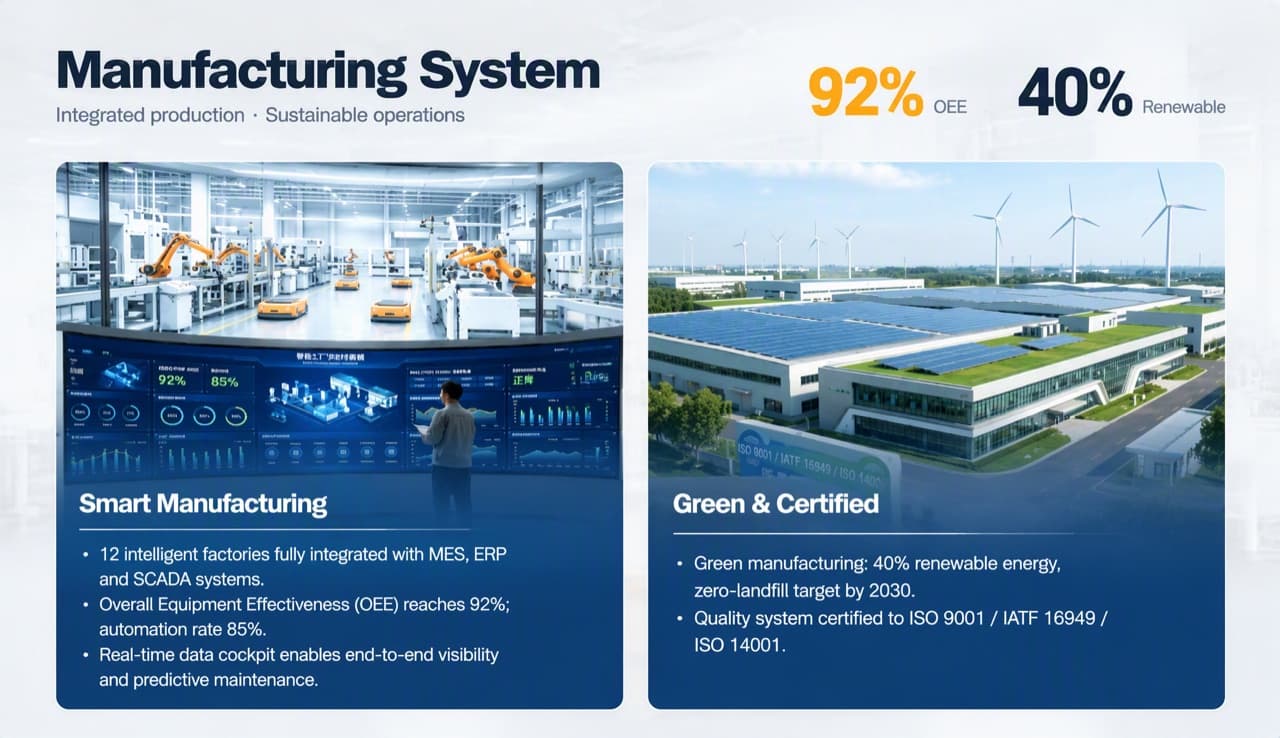
BetterPPT: the company's two own photos become the two large panels (unedited export) - 08
What to check afterwards
Zoom into every drawn picture for small errors such as text on a screen or a sign. Drawings, scans and certificates may be re-rendered in a default redesign, so tell us which must stay exactly as supplied and compare dimensions and labels against your originals. Regenerate a slide up to 3 times free if a picture is off.
Keeping drawings, photos and certificates in a redesign → - 09
A plan for a deck with a fixed date
Day one: write the three-word subject for every slide and gather your own photographs. Day two: fill the gaps from licensed stock with the formula, and mark the slides that need generated concepts. Then decide whether swapping pictures is enough. If not, A $9.90 deposit counts toward the price and shows up to six slides of your own deck redesigned (half the deck for decks of 12 slides or fewer); it is refundable if the preview fails or has an obvious error. At the time of writing (28 November 2026), some decks can also unlock a first look at 3 slides for free by watching a two-minute video; that route is not open to academic or student decks, is limited to one use per account, and may change. Put the slides with the weakest pictures first in a copy of the deck and you will see them redesigned before you pay the rest.
- 10
Where BetterPPT fits
BetterPPT fits people who want a big visual change on a deck they have already written, have some budget, and want to save time: client meetings, investor pitches, board updates and public talks. Each slide is analysed and designed as a whole page by specialised design agents and skills, with an image model drawing it, and you get an editable .pptx with real text boxes and the fonts included plus an HD image version. It only redesigns: no slide is deleted, and page count and order stay as they are. You choose how much wording may change, a text comparison report checks it against your original, and any slide can be regenerated 3 times free. Chart and table text and numbers are restored as text boxes where possible, while the bars and lines stay part of the picture. For everyday or student decks a free tool such as Google Slides is enough, and for class assignments we don't recommend BetterPPT. $39 for up to 30 slides, $59 for 31–50 (prices checked 28 November 2026; right now everyone gets 50% off, so $19.50 for up to 30 slides and $29.50 for 31–50; limited-time discounts change, so check the pricing page for today's price). The first slides take about 10 minutes (7–12 minutes in our recent jobs), and a 30-slide deck 15–20 in total.
BetterPPT vs 24Slides on price and speed →
Questions
How do I find pictures that match a niche B2B slide?
Write the equipment, process and environment for each slide, search with those words plus a camera angle, and exclude generic terms such as handshake, business meeting and laptop. Use your own photographs first.
Can I use AI-generated images in a technical trade-show deck?
As mood or concept, yes. Not as evidence of a specification, a certification, a customer site or a real product: generated equipment can contain wrong details. Zoom in and have an engineer check any picture of your own kind of equipment.
Can a tool replace one image in my PowerPoint without changing the rest?
Alfrada OS's release note of 9 June 2026 says it can replace an image while keeping its position, size and crop, with the rest of the deck preserved. Its examples supply the replacement file. We have not tested it.
Does BetterPPT keep my own photos?
Yes. Good photos are kept, enhanced and often used large; weak or generic ones can be replaced with on-topic imagery, and slides with no picture get one drawn for their subject. Drawings, scans and certificates can be kept as supplied on request.
Can I see my own slides redesigned before paying the full price?
A $9.90 deposit counts toward the price and shows up to six slides of your own deck redesigned (half the deck for decks of 12 slides or fewer); it is refundable if the preview fails or has an obvious error. At the time of writing (28 November 2026), some decks can also unlock a first look at 3 slides for free by watching a two-minute video; that route is not open to academic or student decks, is limited to one use per account, and may change.
How long does a BetterPPT redesign take?
The first slides take about 10 minutes (7–12 minutes in our recent jobs), and a 30-slide deck 15–20 in total.
Bottom line
If a few pictures are wrong, find the real ones and swap them. If the deck is words with decoration, pictures are only part of the problem. BetterPPT is the AI alternative to 24Slides: it designs every page individually, keeps your own photos large when they are the proof, draws on-topic imagery where a slide has none, and gave the most professional result of the four tools in our same-deck test, with an editable .pptx at $39 for up to 30 slides (prices checked 28 November 2026; right now everyone gets 50% off, so $19.50 for up to 30 slides and $29.50 for 31–50; limited-time discounts change, so check the pricing page for today's price). The first slides take about 10 minutes (7–12 minutes in our recent jobs).
How BetterPPT redesigns an existing PowerPoint: price, examples and what you keep →