Ask an AI slide tool to redesign a text-heavy deck and the first thing you notice is the pictures. Some tools add none, so the page stays a page of words. Some add a picture that could belong to any company. Some keep your own photos but shrink them into a small box under the text. None of that is a picture that proves what the slide is about. We looked at this on two slides. On 18 October 2026 we put the same 8-slide deck through BetterPPT, Gamma, Wonderslide and Plus AI. This is our reading of two slides in one test, plus dated reports from other tests, not a verdict on every slide these tools make. BetterPPT is a different kind of tool: an AI-powered alternative to design services like 24Slides, which designs each slide of the deck you already wrote as a whole page and returns an editable .pptx with real text boxes and the fonts included, a one-off $39 for up to 30 slides (prices checked 17 November 2026; right now everyone gets 50% off, so $19.50 for up to 30 slides and $29.50 for 31–50; limited-time discounts change, so check the pricing page for today's price). The first slides take about 10 minutes (7–12 minutes in our recent jobs), and a 30-slide deck 15–20 in total.
- 01
Three ways a picture goes wrong
It is missing: the tool changes colours and fonts but adds nothing to look at. It is generic: a stock-style photo or icon that would fit any company in the same industry. Or it is too small: your own photo, which is the best proof you have, ends up as a thumbnail under a block of text. All three leave the viewer reading words, when the picture could have carried the point in a second.
- 02
The title slide: add nothing, or add something
The original title slide is four lines of text on white, with no image. In our test Plus AI added no imagery and gave a light panel and a navy block with the year; Wonderslide gave a dark solid background with centred text; Gamma generated a factory picture behind a text panel; BetterPPT drew a full-bleed factory scene with the company name over it. Two of the four returned a title slide with nothing to look at, two added a scene about the company's subject. These are unedited exports.

Original: four lines of text, no image 
Plus AI: light panel and navy block, no image added (unedited export) 
Wonderslide: dark solid background, no image (unedited export) 
Gamma: generated factory picture behind a text panel (unedited export) 
BetterPPT: full-bleed factory scene with the company name over it (unedited export) - 03
The manufacturing slide: your own photos
The original has five bullets and two photos of the company's own control room and green factory. Plus AI placed the photos small under two text cards. Gamma used them as small thumbnails with captions and a paragraph above. Wonderslide generated an isometric factory with the five points as callouts, so the original photos are not the picture. In the BetterPPT version the two photos became the two large panels, with the headline figures on top. Unedited exports.
The full same-deck test of four AI tools →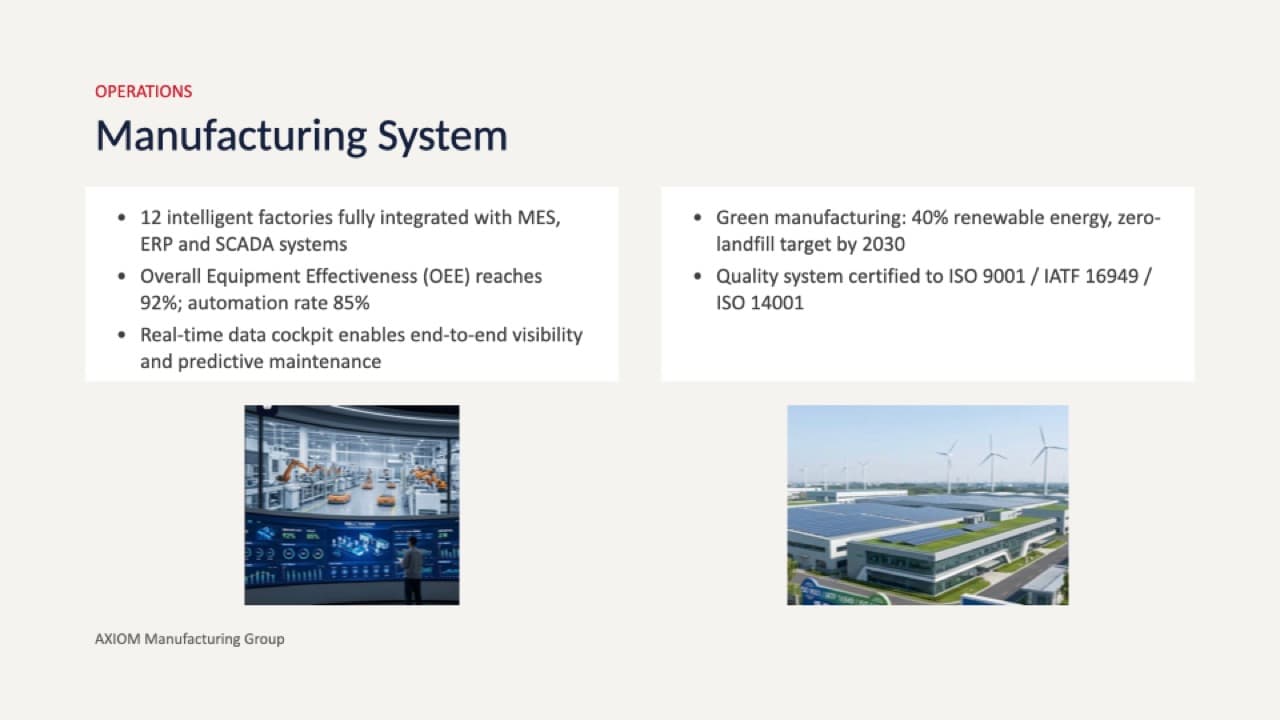
Plus AI: two text cards, photos small underneath (unedited export) 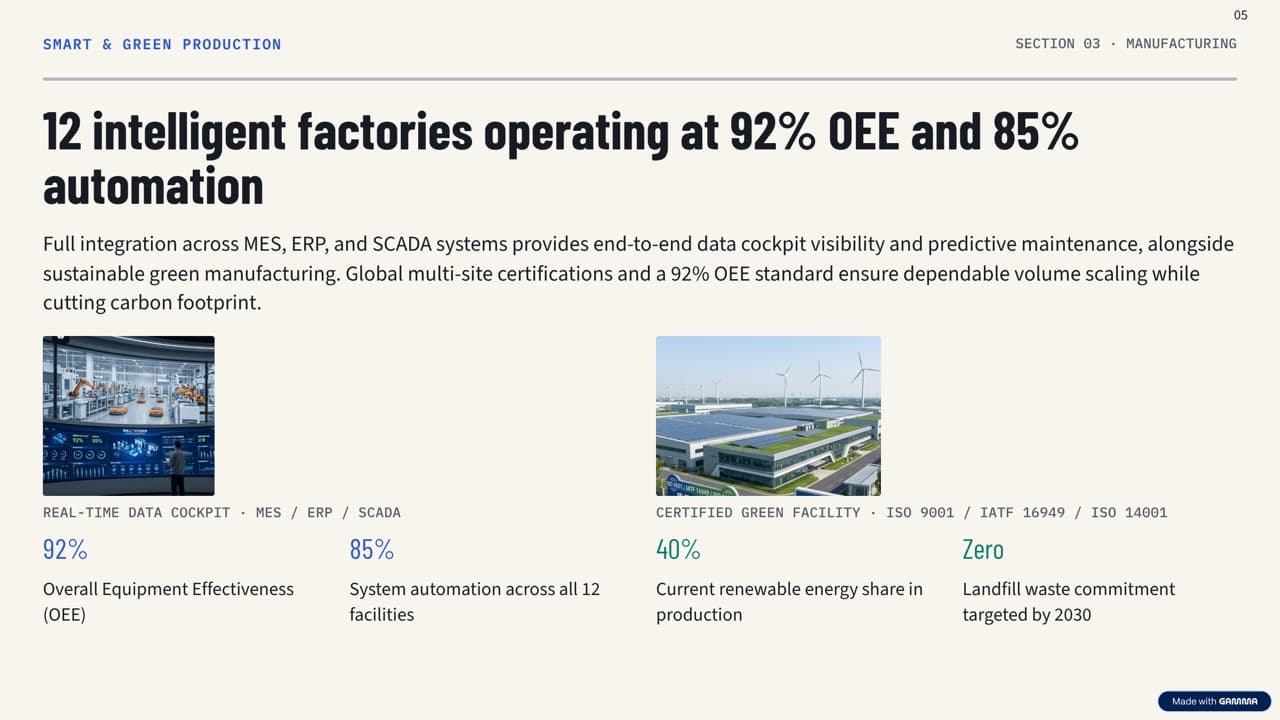
Gamma: small photos with captions under a paragraph (unedited export) 
Wonderslide: a generated isometric factory with callouts (unedited export) 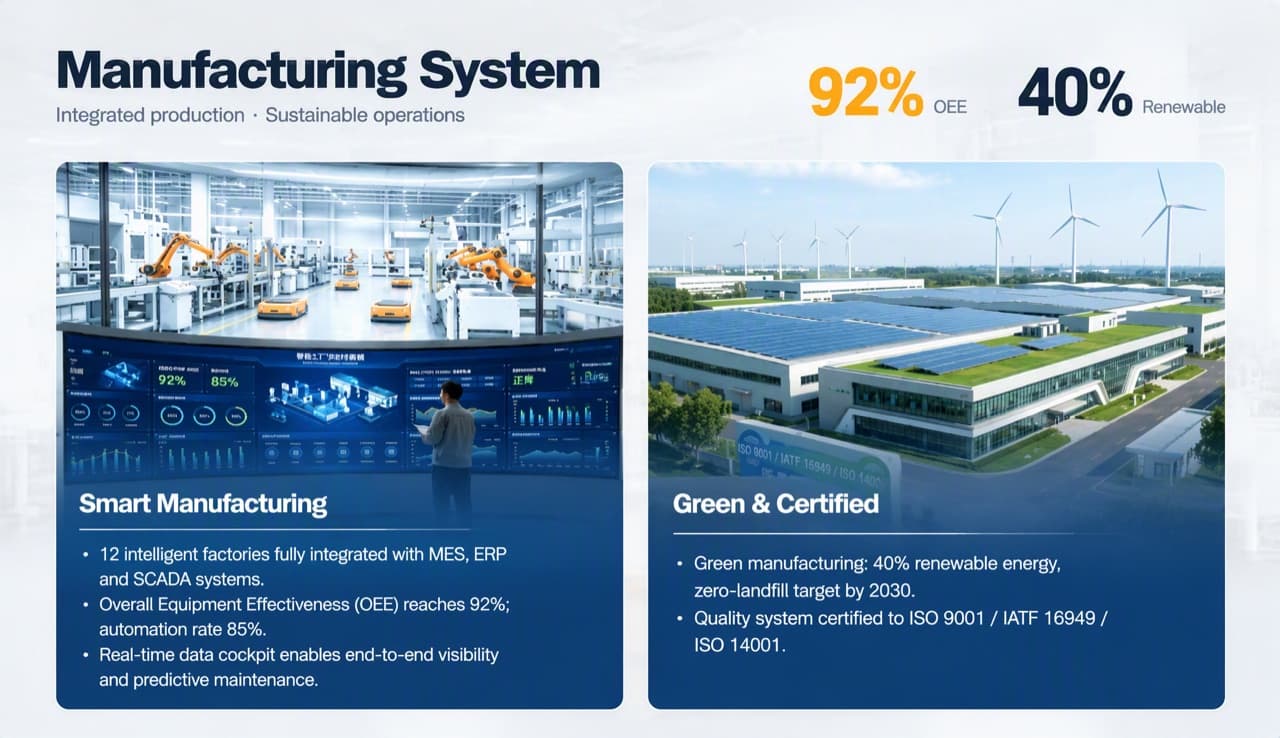
BetterPPT: the two photos become the two large panels (unedited export) - 04
What other tests report
Wonderslide, a competitor, published a test on 5 October 2026 of seven tools on one 12-slide report; it says Presenti AI added an unrelated stock photo and that its own tool replaced weaker photos with stock photos (we read the post on 24 November 2026). In our own side-by-side on one team slide, Kimi regenerated the page and swapped our real headshots for generic placeholder icons. Both are single tests, not rules, but they match the pattern above: when a tool does not know what a picture is for, it fills the space with something generic.
BetterPPT vs Kimi on one team slide → - 05
How to tell whether a picture belongs to its slide
Cover the text and look at the picture alone: does it say what the slide is about? Would it fit equally well on a competitor's deck? Does it show something specific from your content, such as your product, site or people? And is it large enough to read as evidence rather than decoration? If the answers are no, no, no and no, the picture is filling space, and a smaller version of the same picture will not fix it.
- 06
What a picture that fits looks like, and one thing to check
On each slide the picture is chosen for what that slide has to prove: your own photos are re-composed and used large when they are the proof, and new imagery is drawn for slides that have none, so the page stays about your subject. BetterPPT analyses every slide with specialised design agents and skills and draws the whole page with an image model. One thing to check: generated pictures can contain small details, such as text on a screen or a sign, that are not right, so zoom into any generated picture before you present, and regenerate the slide up to 3 times free if something is off.
- 07
Where BetterPPT fits
BetterPPT fits people who want a big visual change on a deck they have already written, have some budget, and want to save time: client meetings, investor pitches, board updates and public talks. Each slide is analysed and designed as a whole page by specialised design agents and skills, with an image model drawing it, and you get an editable .pptx with real text boxes and the fonts included plus an HD image version. It only redesigns: no slide is deleted, and page count and order stay as they are. You choose how much wording may change, a text comparison report checks it against your original, and any slide can be regenerated 3 times free. Chart and table text and numbers are restored as text boxes where possible, while the bars and lines stay part of the picture. For everyday or student decks a free tool such as Google Slides is enough, and for class assignments we don't recommend BetterPPT. $39 for up to 30 slides, $59 for 31–50 (prices checked 17 November 2026; right now everyone gets 50% off, so $19.50 for up to 30 slides and $29.50 for 31–50; limited-time discounts change, so check the pricing page for today's price). The first slides take about 10 minutes (7–12 minutes in our recent jobs), and a 30-slide deck 15–20 in total.
BetterPPT vs 24Slides on price and speed →
Questions
Why do AI slide tools add pictures that don't match my topic?
Our reading: a tool that does not know what a picture is for fills the space with something generic. Wonderslide's test of 5 October 2026 reports an unrelated stock photo from Presenti AI, and in our own test of one team slide Kimi swapped real headshots for placeholder icons.
Do AI presentation tools add pictures automatically?
It varies. In our same-deck test of 18 October 2026, Plus AI added no imagery, Wonderslide and Gamma added generated imagery on some slides, and BetterPPT added it on most.
Will my own photos be kept in a redesign?
In BetterPPT good photos are kept and re-composed, often used large; weak or generic ones are replaced with on-topic images. Slides are never deleted, and page count and order stay the same.
Can a generated picture contain mistakes?
Yes. Small details such as text on screens or signs can be wrong, so zoom in before you present. BetterPPT lets you regenerate any slide up to 3 times free.
How fast is BetterPPT?
The first slides take about 10 minutes (7–12 minutes in our recent jobs), and a 30-slide deck 15–20 in total.
Bottom line
A slide with the right picture needs fewer words. If your finished deck's pages are text with a thumbnail, BetterPPT is the AI alternative to 24Slides: it redesigns every page individually with imagery that belongs to its subject, gave the most professional result of the four tools in our same-deck test, and returns an editable .pptx for $39 up to 30 slides (prices checked 17 November 2026; right now everyone gets 50% off, so $19.50 for up to 30 slides and $29.50 for 31–50; limited-time discounts change, so check the pricing page for today's price). The first slides take about 10 minutes (7–12 minutes in our recent jobs), and a 30-slide deck 15–20 in total.
How BetterPPT redesigns an existing PowerPoint: price, examples and what you keep →