Help & how it works

Everything you need to turn the deck you already wrote into a polished, editable PowerPoint.

How it works

01

Upload your .pptx

Drop in the deck you already have — no template picking, no starting from scratch.

02

Preview with a refundable deposit

Pay a $9.90 refundable deposit and see a full-quality before / after of up to 6 of your pages, plus a design diagnosis. Not happy? We refund the deposit.

03

Pay the rest only to download

Happy with it? Pay the balance to unlock the polished .pptx at one flat price. No subscription.

Common questions

Is the downloaded PowerPoint really editable?

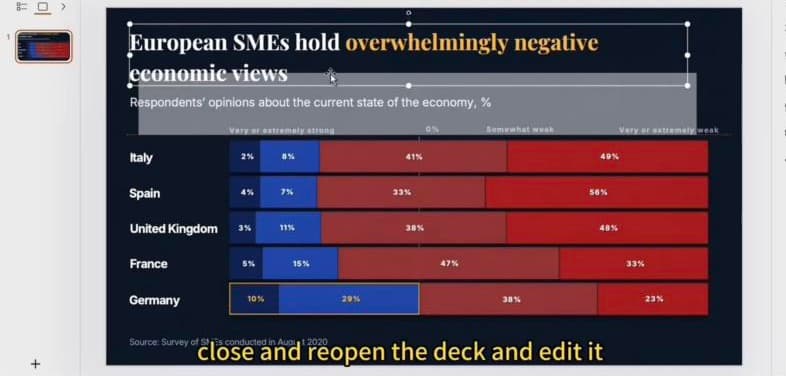
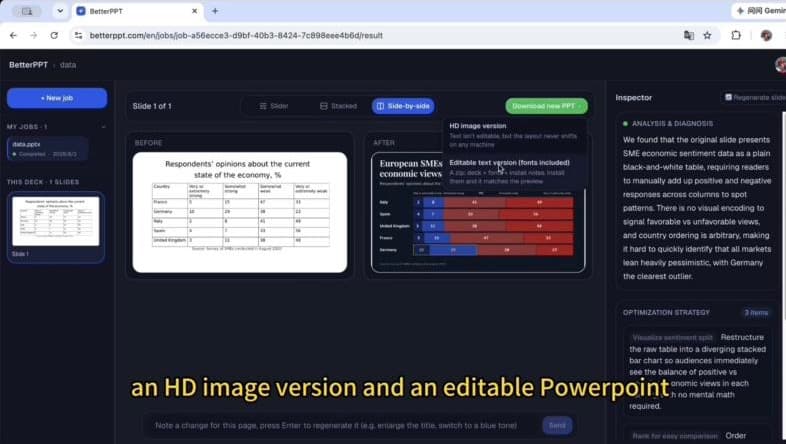
Yes. The editable version is a real .pptx with genuine text boxes — open it in PowerPoint or Google Slides, click any title or label and retype it, like any deck you made yourself. It comes as a zip with the fonts included; install them and the file matches the preview exactly. If you don't plan to change any words, you can download the HD image version instead.

The editable .pptx open in PowerPoint — the title is a normal text box you can select and retype.
Two download options: an HD image version, and an editable text version with fonts included.

What stays the same, and what changes?

When you choose “use my text exactly as written”, every word stays as you wrote it, along with your numbers and slide order. Good original photos are kept and enhanced (extended or retouched to fit the new layout); weak or generic ones are replaced with new images matched to your industry and topic. What changes is the visual layer: layout, hierarchy, fonts, color and image treatment. You can also allow light wording edits if you want tighter text.

How does the preview before payment work?

Pay a $9.90 refundable deposit and you'll see a full-quality before / after of up to 6 of your pages plus a design diagnosis. If you're not happy, email support@betterppt.com and we'll refund the deposit. If you are, pay the balance when you download — one flat price per deck, no subscription.

How long does it take, and how big can my deck be?

A 30-slide deck takes about 15–20 minutes; longer decks take a little more. You can upload a .pptx of up to 50 slides and 50MB.

How are my files kept private?

Files are transferred over encrypted connections and stored in private storage. Unpaid decks are deleted automatically after 7 days; paid decks are kept for 1 year so you can download them again, and you can delete any deck at any time.

Tips for the best results

  • Pick the right scenario and industry on the Configure step — it steers the redesign.
  • Add your brand color, font, or logo if you have them, for on-brand output.
  • Not perfect? Once you unlock your deck, re-edit any single page for free.
See pricing & FAQ →

Account & billing

BetterPPT is pay-per-deck — there's no subscription to manage or cancel. You're charged one flat price per deck when you download it.

Manage your profile or sign out from the avatar menu in the top-right. Switch language anytime with the EN / 中文 toggle.

Still stuck?

Email us and we'll get back to you, usually within a day.

support@betterppt.com

Ready for your AI PowerPoint redesign?