A qualification or supplier-audit deck is judged on facts, so a redesign should change how the facts look, not the facts. Choose keep every word, list the numbers, dates and certificate details that must not move, and tell us which drawings, scans and certificates must stay exactly as supplied: we put your originals back, and clear site photos are kept and enhanced. In a real redesign of a Korean civil contractor's project slide, the site photo was kept, enlarged and extended at the top, and the text came through line for line; the section drawing was re-rendered in the default redesign, which is exactly what the "keep as supplied" request is for. The same checks apply to factory, aviation-maintenance and mining-contractor decks; we only have a civil-works example to show.
- 01
What a qualification deck is judged on
A prime contractor, an OEM's supplier-audit team, an owner or an insurer reads a qualification deck looking for proof: licences and certificates with their numbers and expiry dates, capacity with its unit (per shift, per year), headcount, years in business, completed projects with a size and a date, safety figures with their period, and drawings and photos that show the work. Style comes second. The redesign job is to make those facts easy to find without touching them. The example below is a civil-works contractor's slide; factories, aviation maintenance shops and mining contractors submit the same kinds of material, but we have not yet seen their decks, so check your own file in the preview.
- 02
A real slide: the photo was kept, the drawing was redrawn
The original is a template slide with a yellow banner, eight lines of text, a small section drawing and a site photo of a twin-cell concrete culvert. The redesign puts the same eight lines in a clean list, enlarges the drawing and the photo, and gives the slide a headline. It shows what a redesign does with each kind of content: the text is carried over, the photo is the same culvert, wall and vegetation, and the drawing was re-rendered to fit the new layout in the default redesign. Project and company names, and a faint watermark across the original photo, are masked in the left image.
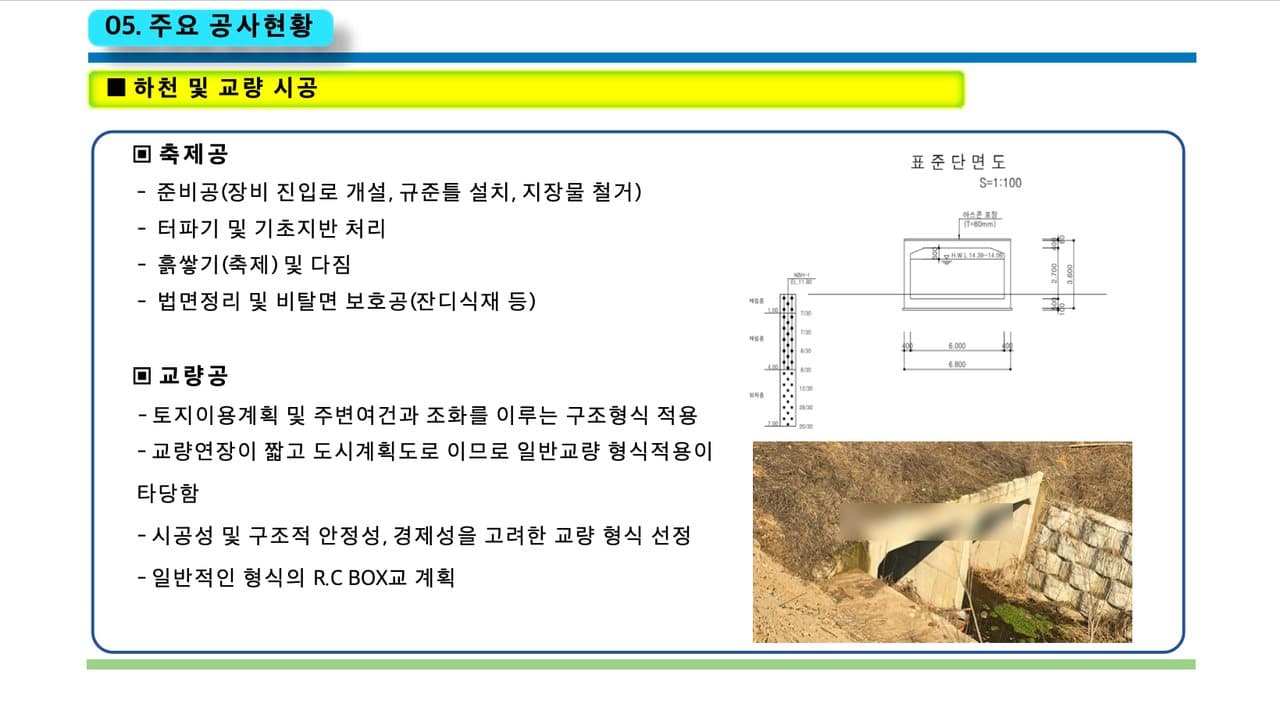
Before: a template slide with eight lines, a small section drawing and a site photo 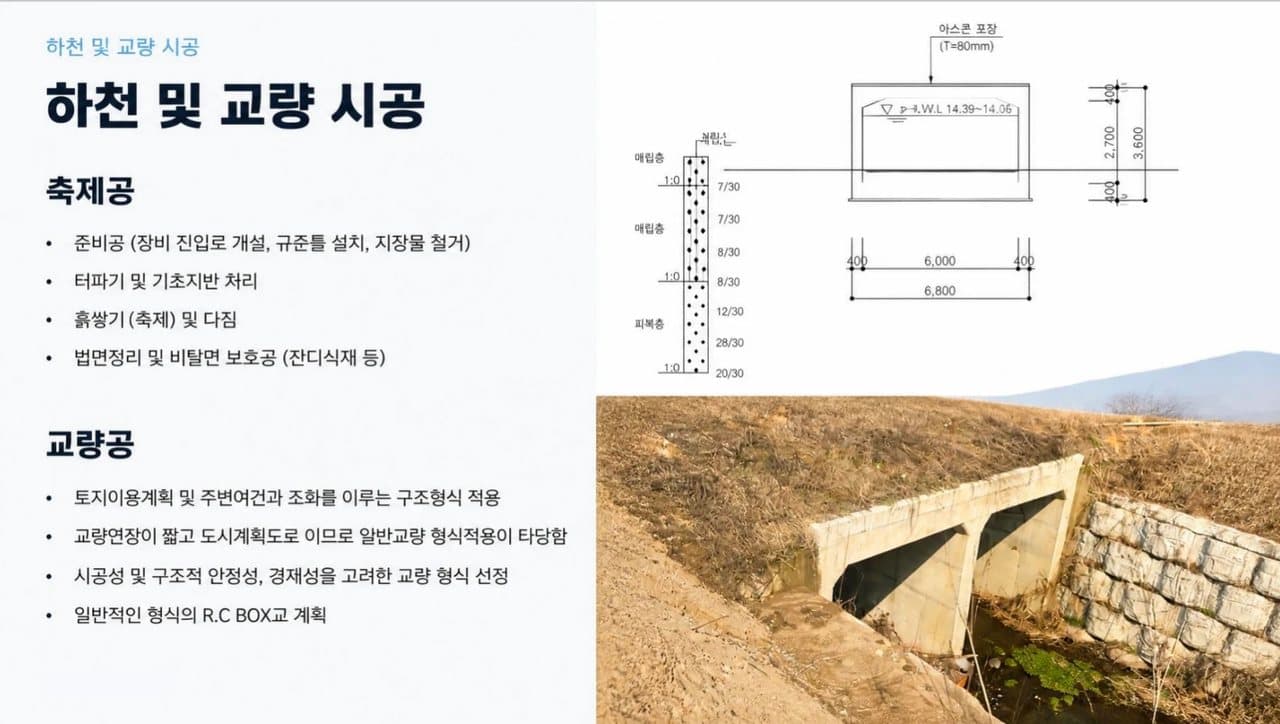
After: the same text, the photo enlarged and extended at the top, the drawing re-rendered by default - 03
Site photos: a clear original is kept and enhanced
BetterPPT looks at each picture in your deck on its own. A clear original, such as your own site, plant or team photo, is kept and enhanced to suit the new layout; a weak or generic picture can be replaced with a new image that fits the topic. In this example the culvert photo was kept, enlarged and brightened, the top edge was extended with sky and hills that are not in the original frame, and the faint watermark across the original is not in the redesigned photo. An extension is generated, so if a photo is your evidence that a project exists, check what was added. Look at every photo in the preview, and if one must stay exactly as shot, tell us.
- 04
Technical drawings: ask for them to stay exactly as supplied
In the default redesign a drawing is re-rendered to match the new layout. We compared the two drawings label by label. What came through: the large dimensions (2,700, 3,600, 6,000, 6,800 and the 400 offsets), the pavement note “T=80mm”, and the soil test values down the left side (7/30 to 20/30). What changed: the borehole tag (NBH-1, EL. 11.80), the depth marks 1.00, 4.00 and 7.00, the first letter of the water-level label H.W.L, one soil-layer label, the small figures in the right-hand dimension column (80, 500 and 100 in the original) and the caption “Standard section, S=1:100”. The original drawing was small and low-resolution, which makes any redraw harder. For a qualification review this is the one place to be deliberate: tell us which drawings must stay exactly as supplied, in the requirements box on the setup page, and we put your original back on the slide. You can also place your original picture on top of the redesigned slide in PowerPoint yourself. Either way, compare every figure with your original before you submit.
- 05
The words on the slide: same lines, less frame
The eight text lines are the same in both versions, apart from a space before a bracket. What disappeared is the frame around them: the section label “05. Major works” in the top corner, the project-name line at the top right, and the drawing caption. A section number or project line can be exactly what a reviewer uses to find a page, so after a redesign look for headers, footers, captions and page references as well as the body text.
- 06
A freeze list for qualification decks
Before you start, write down what must not change: certificate names, numbers and expiry dates; capacity figures with their units and basis; headcount, years in business and project values with their dates; the period behind every safety statistic; client names; and the drawings and scans that must stay exactly as supplied. Choose keep every word, paste the list under “Any special requirements?” on the setup page, and afterwards compare the new slides with your original. The download menu has a text comparison report for the editable file; pages that come back as whole images, and anything drawn into a picture, need an eye check.
How to check nothing was changed, page by page → - 07
Certificates, scans and maps: keep them as supplied
A scanned certificate or a map is a picture of text, so the safest treatment is the simplest one: tell us it must stay as supplied and we keep your original, or attach the original file in the order the reviewer asks for, and use the redesigned deck for the story around it. In our travel-deck example, a map that was redrawn by default came back with garbled place labels, which is why we treat maps and scans this way.
A map that came back with garbled labels → - 08
What it costs, and how to try it
BetterPPT is $39 for up to 30 slides and $59 for 31–50, once, with no subscription, and a 30-slide deck takes about 15–20 minutes. A $9.90 deposit counts toward the price and shows you up to six of your own slides first, so you can look at a photo slide and a drawing slide before paying the rest. Your deck's language stays your deck's language: the Korean example came back in Korean. If a tender or qualification document is confidential, we can sign an NDA on request: email support@betterppt.com before you upload. Slide content is processed by external AI models, so for sensitive drawings upload a sanitised copy.
See how it works → - 09
Who BetterPPT is for, and when a free tool is enough
BetterPPT is an AI-powered alternative to design services like 24Slides: it redesigns the PowerPoint you've already written, every slide individually, and returns an editable .pptx. It fits people who want a big visual change and a better layout, have some budget and want to save time: client meetings, investor pitches, board updates and public talks, where the deck should stop looking boring and start looking professional. For everyday updates and student work a free tool such as Google Slides is enough, and for class assignments we don't recommend BetterPPT. $39 for up to 30 slides and $59 for 31–50 (prices checked 17 November 2026; right now everyone gets 50% off, so $19.50 for up to 30 slides and $29.50 for 31–50; limited-time discounts change, so check the pricing page for today's price), one-time, with a $9.90 deposit to preview up to six of your slides first. Practical limits: it takes decks of up to 50 slides.
How AI redesign of an existing deck works →
Questions
How do I redesign a supplier qualification deck without changing certificates or capacity numbers?
Choose keep every word, list the certificate numbers, expiry dates, capacity figures with units and any statistic periods under “Any special requirements?”, and name any scans that must stay as supplied. Then compare the redesigned slides with your original line by line; the text comparison report in the download menu lists every line that differs.
Will my technical drawings be kept exactly as they are?
Yes, when you ask. In the default redesign a drawing is re-rendered to fit the new layout: in our civil-contractor example the large dimensions came through and some small labels changed. Tell us which drawings must stay exactly as supplied (in the requirements box) and we put your original back. Compare every figure before you submit.
Will my own site photos be kept in a redesign?
A clear original photo is kept and enhanced to suit the new layout, and a weak or generic one can be replaced. In our example the culvert photo was kept, enlarged and extended at the top with generated sky and hills. Look at every photo in the preview, and tell us if one must stay exactly as shot.
Can I use it for a factory, aviation-maintenance or mining-contractor qualification deck?
The structure is the same: certificates, capacity, track record, drawings and photos. We only have a civil-works contractor's slide to show, so judge the preview on your own file and check every figure before you submit.
Can I upload confidential customer drawings or export-controlled data?
Only if your contract and your own policy allow it. Slides are processed by external AI models, unpaid decks are deleted after 3 days, files sit in private storage, and an NDA can be signed on request (email support@betterppt.com before you upload; it binds BetterPPT only). We hold no compliance certifications and no export-control approval, so do not upload data that is export-controlled or that a customer's contract forbids sending to third parties. Upload a copy with those pages removed or masked, and put the original pages back afterwards.
How do I make a factory audit PowerPoint or a vendor qualification deck look professional?
Open with one slide that answers the auditor's questions: who you are, what you make, how much, and who certified it. Then give process, inspection and quality records one slide each, show capacity with its unit and period, and use photos of your real site. Keep certificate numbers, capacity figures and defect rates exactly as they are, choose keep every word, and compare the redesigned slides with your original before you present.
What goes into a supplier capability presentation or an OEM technical presentation?
The buyer's engineers look for the equipment list with models, the process flow, inspection and test methods, quality certificates with their scope, capacity and lead times, and customer or project references. Give each its own labelled slide, and put technical drawings and test reports in exactly as supplied.
How much does it cost, and can I sign an NDA first?
$39 for up to 30 slides and $59 for 31–50, one-time. A $9.90 deposit counts toward the price and shows up to six of your own slides first. An NDA can be signed on request (email support@betterppt.com before you upload); it binds BetterPPT only, and external AI models still process the slide content.
Bottom line
If the facts are right and the deck has to look like a firm worth qualifying, BetterPPT redesigns every slide individually and returns an editable .pptx: $39 for up to 30 slides, with a $9.90 deposit to see up to six of your own slides first. Keep your drawings and certificates as original files, and check every figure before you submit. What you get is the most professional result of the four tools in our same-deck test, a strict keep-every-word option, chat editing for any slide, and the first slides in about 10 minutes (7–12 minutes in our recent jobs).
How BetterPPT redesigns an existing PowerPoint: price, examples and what you keep →