Give each day its own slide, put the price per person where the eye lands first, and keep the practical details in a short, labelled list. That is what turns a wall of bullets over a faded photo into an itinerary people can follow. The slides below come from a real eight-person group trip to Vietnam, redesigned with BetterPPT. The same layout works for a travel agency's proposal to a client or a destination management company's day-by-day plan. It also shows two things to check afterwards: the redesign condensed some practical details, and an AI-redrawn map came back with garbled place labels.
- 01
One day, one slide: split the day into three blocks
The original day slide has a title, 14 bullets in two sizes and a faded photo behind them, with booking instructions in red. The redesign gives the day three labelled blocks: Travel, Villa, Today. It puts the two numbers a group cares about, $16 per person for the van and $490 per person for two nights, in large type, and keeps the activities as one short line each. A reader scanning the deck should see the day, the cost and the plan without reading a sentence.

Before: 14 bullets over a faded photo, booking notes in red 
After: three blocks, two prices in large type, the photo given its own space - 02
Travel-day slides: a real photo and a short list beat a grey background
The original travel-day slide places black text over a darkened grey street photo, with a small hotel photo in the corner. The redesign gives the left third to the text on a dark panel, makes the date and the price stand out in a single accent colour, and a new full-colour street scene replaces the grey one, with the hotel photo kept beside it. The facts that matter are all still there: the airline, the layover, the hotel, the price per person and the weather range.
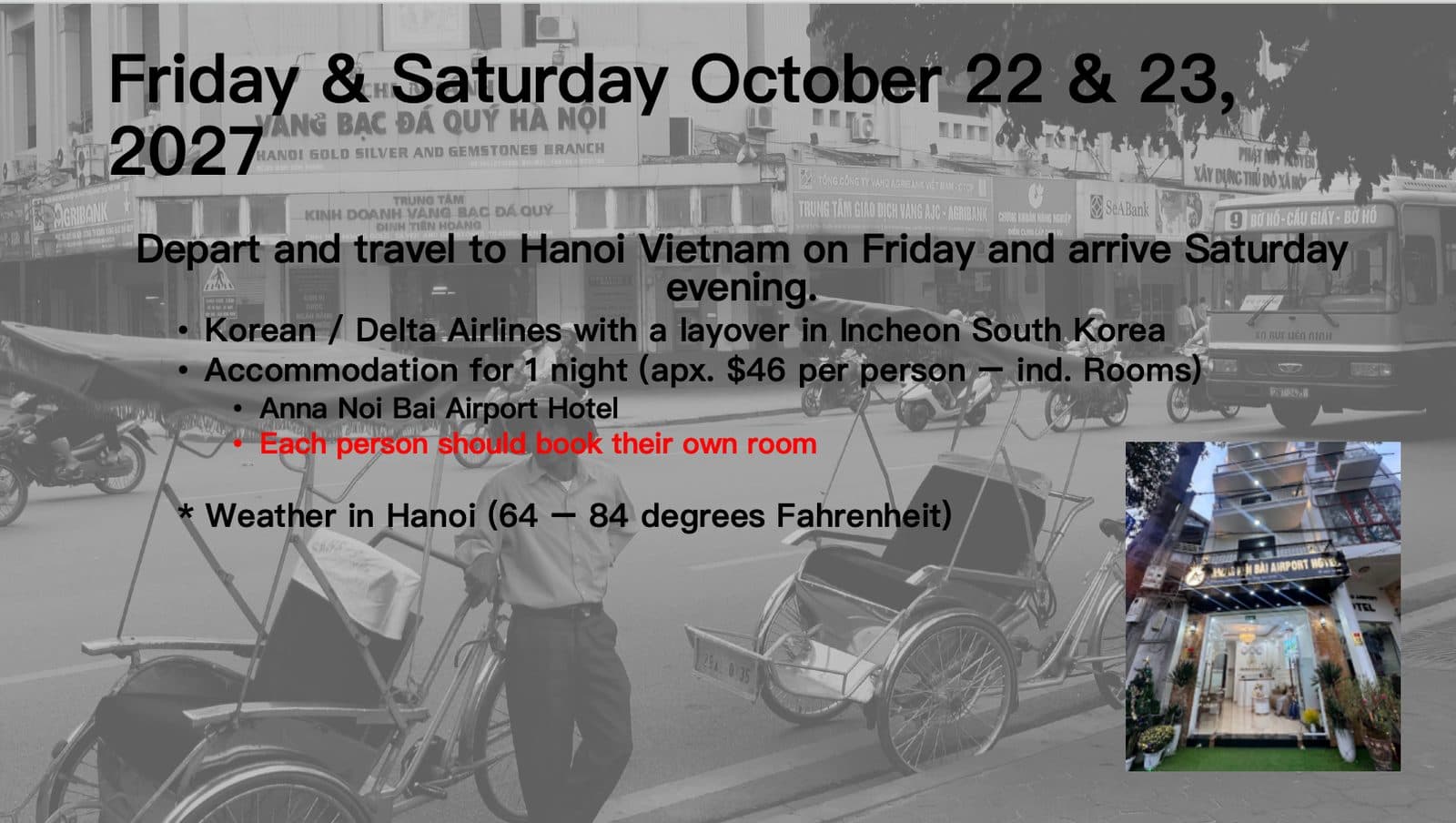
Before: black text over a grey street photo, small hotel photo 
After: text panel, accent-coloured price, a full-colour street scene and the hotel photo - 03
What to check afterwards: details, and map labels
Compare the day slides with your original. In this run the text was condensed: the “designate person 6 to book the van on one card” notes, the “shops close at 11 pm” tip, the flashlight note and the “$3,918 for two nights” total behind the per-person price were not carried over. For an itinerary, those small practical lines are often the point. Check any redrawn map too: in the same deck a redrawn map of Vietnam came back with several garbled place labels, so we haven't used that slide here. Read every label on a map, a sign or a screen in a generated image.
How to check nothing was changed, page by page → - 04
For agencies and DMCs: the five slides every proposal needs
A client-facing travel proposal usually needs an overview (dates, group size, theme), a day-by-day plan, what is included and excluded, a price table, and terms and next steps. Give the price table the same care as a finance slide: units, currency and what each figure covers. If three people build the deck, merge their slides into one file first and redesign it in one pass so every day looks like the same trip.
Make decks from several people look consistent → - 05
Choose the content mode that fits an itinerary
On the setup page you choose how much the wording may change: keep every word, light editing, or restructuring. Condensing is fine for a first draft. For a proposal that quotes times, prices and who books what, choose keep every word and compare the result with your original before you send it.
What each content mode changes → - 06
What it costs, and how to try it
BetterPPT is $39 for up to 30 slides and $59 for 31–50, once, with no subscription, about 15–20 minutes for 30 slides. A $9.90 deposit counts toward the price and shows you up to six of your own slides before you pay the rest. For a proposal that contains client details, we can sign an NDA on request: email support@betterppt.com before you upload.
See how it works → - 07
Who BetterPPT is for — and who it isn't
BetterPPT is an AI design agent that redesigns PowerPoint decks you've already written — every slide individually — and returns an editable .pptx. It is built for business decks where a lot is riding on the result, and where you already have the content. It isn't for a class assignment or a routine team update, where PowerPoint's own Designer or Canva's free plan is enough, and it isn't for a deck of more than 50 slides.
How AI redesign of an existing deck works →
Questions
How do I make a travel itinerary presentation look professional?
Give each day its own slide, split the day into a few labelled blocks, show the price per person in large type, use one or two good photos instead of a faded background, and keep the practical details in short lines.
Can AI redesign my travel proposal without changing the itinerary or prices?
Choose keep every word, then compare every time, price and instruction with your original. In our example run the text was condensed and some practical details were dropped, so check before you send.
Can BetterPPT redesign a deck with maps?
It can, but maps redrawn by AI can come back with garbled labels. Read every place name on the result, or keep your original map slide and paste it in.
How much does it cost to redesign a travel agency's proposal deck?
$39 for up to 30 slides and $59 for 31–50, one-time, with no subscription. A $9.90 deposit counts toward the price and lets you see up to six redesigned slides first.
We built the deck as a group, and it looks inconsistent. Can it be unified?
Yes: merge everyone's slides into one file, upload it once and choose one style, so every day follows the same design. Check the wording afterwards.
Bottom line
If you have the itinerary and need it to look like a trip people want to book, BetterPPT redesigns every slide individually and returns an editable .pptx: $39 for up to 30 slides, with a $9.90 deposit to see up to six of your own slides first.