If your deck already has one clear thing to read on each slide, sizes that step down the same way on every page, pictures that belong to the topic and a look that is not the same card repeated, you do not need an AI redesign tool, including ours. A few fixes by hand will do. BetterPPT is built for a different person: someone who knows what the deck has to say and has written it, but does not know how to design it, and wants a big visual change rather than a polish. The five checks below take about ten minutes and tell you which of the two you are. BetterPPT is a different kind of tool: an AI-powered alternative to design services like 24Slides, which designs each slide of the deck you already wrote as a whole page and returns an editable .pptx, a one-off $39 for up to 30 slides (prices checked 28 November 2026; right now everyone gets 50% off, so $19.50 for up to 30 slides and $29.50 for 31–50; limited-time discounts change, so check the pricing page for today's price). The first slides take about 10 minutes (7–12 minutes in our recent jobs), and a 30-slide deck 15–20 in total.
- 01
What a redesign tool changes, and what it leaves alone
BetterPPT only redesigns. It does not write your content, delete slides or reorder them: page count and order stay as they are, and you choose how much wording may change, down to a strict keep-every-word option. What it changes is everything you see: layout, typography, colour, pictures and how the page is ranked. That is why it pays off when the look is the problem, and adds little when the look is already right. A deck that someone has carefully laid out will come back laid out differently, which is a gain only if you wanted a different look.
- 02
Check 1: say what you see first, second and third
Open three slides from different parts of the deck. Look at each for two seconds, look away and say what you saw first, second and third. If you can name the point of every slide and the figure that matters, the hierarchy works. If the answer is "a block of text" or "a list" on most of them, the slides have no order, whatever their colours. In the example below, five bullets and one photo share one text size; the BetterPPT version ranks them, with a headline, three large figures and quiet body text.
What an ordered slide looks like →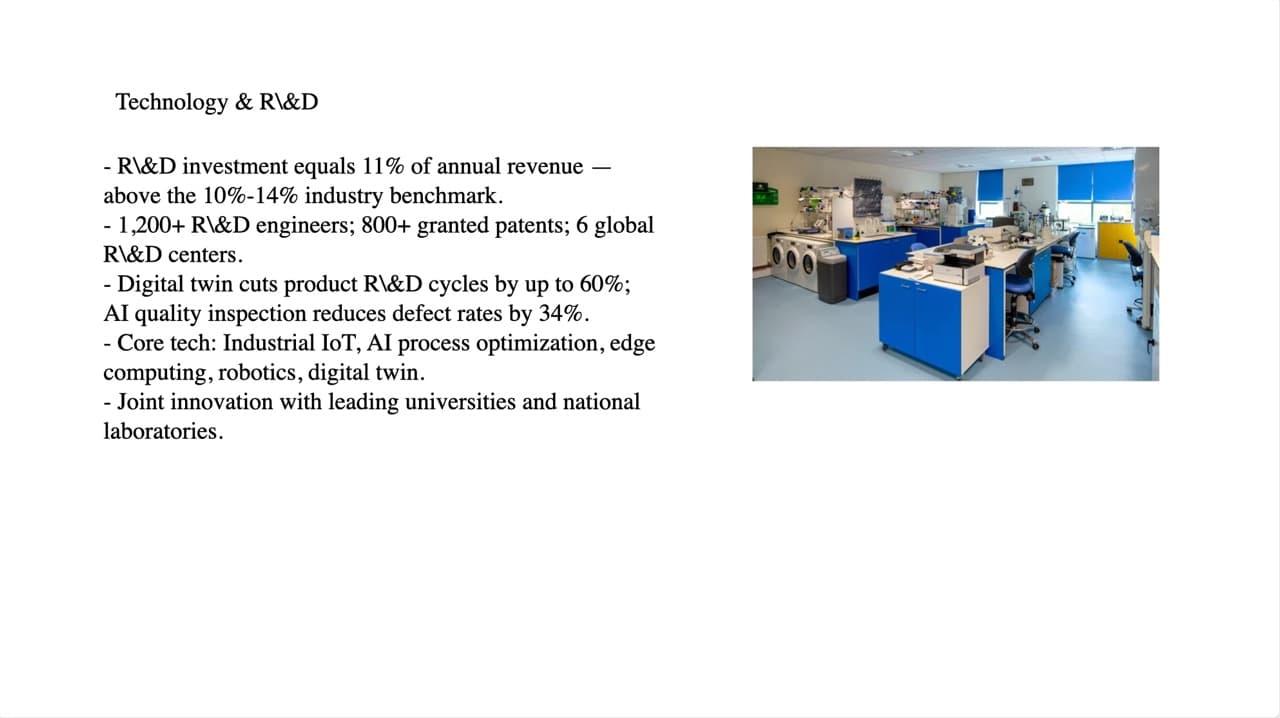
Fails check 1: five bullets and one photo, one text size 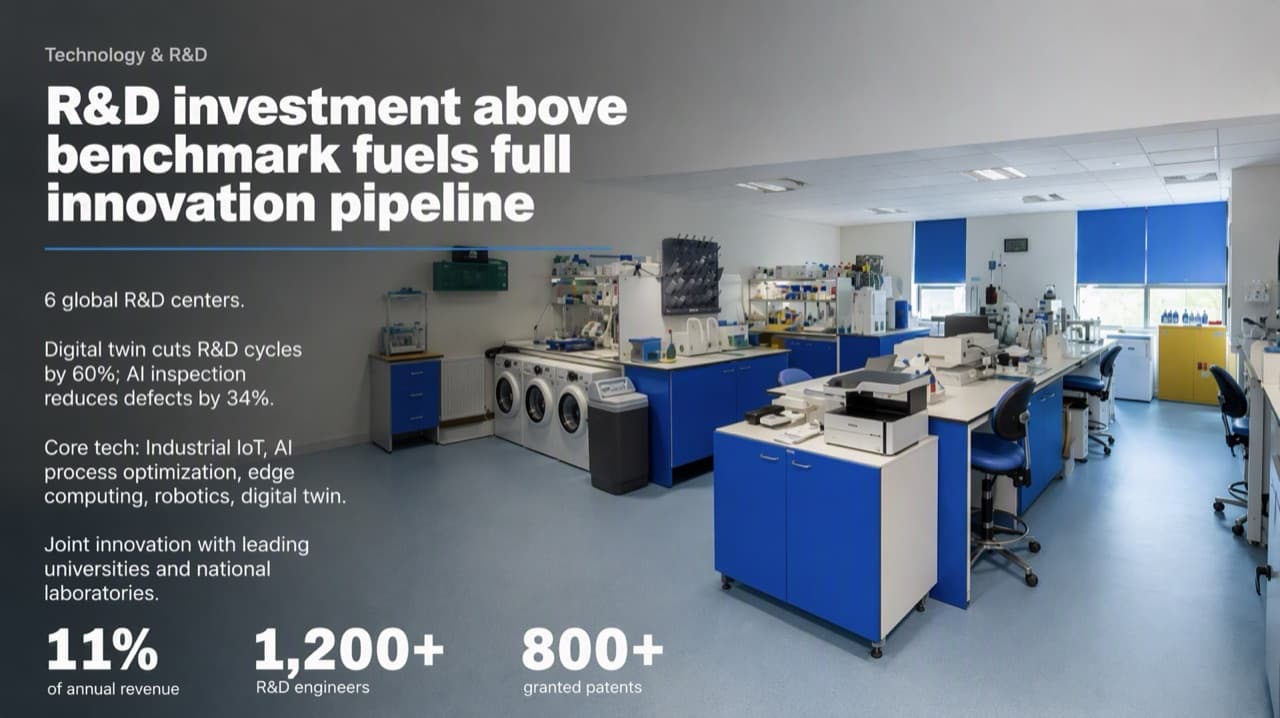
After a redesign: headline, three large figures, quiet body text (unedited export) - 03
Check 2: do the sizes step down the same way on every slide?
Compare the headline, sub-heading and body on four slides. If the sizes are close or change from slide to slide, that is a type problem, and it can often be fixed without a redesign: set the sizes in the Slide Master, or run them through the ladder in our type guide. If the sizes are consistent but the page still has no focus, go back to check 1: the problem is ranking, which is design.
Fix font sizes across a whole deck → - 04
Check 3: does each picture belong to its slide?
Cover the text and look at the picture. Does it show something specific to your content, or would it fit any company in your industry? If three or four pictures are wrong and the layouts are fine, swap the pictures yourself. If the whole deck is words with decoration, or your own good photos are shrunk into a corner, pictures are part of a larger layout problem.
Pictures that match each slide → - 05
Check 4: do different kinds of slide look different?
Page through the deck fast. A KPI page, a timeline, a comparison and a photo page should not all be the same grid of cards. If every slide is the same template with new content, the audience feels it by slide five. If your slides already have different structures for different jobs, you are ahead of most decks, including most AI-made ones.
Five slides that show whether it is just a card template → - 06
Check 5: must the deck follow a template you cannot change?
If a client or your company requires a specific template, with its layouts and placeholders, your decision is already made: work inside that template. BetterPPT does not load your template or lock a Slide Master. You can ask it to keep your logo, footer, page numbers, brand colours and fonts on every page, but if the rule is placeholder by placeholder, a tool built around your template fits better.
A tool that builds on your own template: wetria → - 07
Reading your answers
Count how many checks failed. Zero or one: leave the deck, or fix that one thing yourself. Two or three: fix the sizes or swap the pictures yourself, or test the weakest five slides in a preview before deciding. Four or five: the deck needs design, not editing, and a redesign is likely worth it. This is a rule of thumb, not a measurement, and the deadline matters too: the evening before a meeting, a fix you can do in 30 minutes beats a big change you have not checked.
- 08
Who BetterPPT is built for
People who have a finished deck and do not know how to design it: founders with an investor deck written in an evening, managers with a client proposal, consultants with a report that has to look expensive, speakers with a talk. They want a big visual change, have some budget and want to save time compared with a design service. It is not for decks that already look designed, for a routine team update or for a class assignment, where a free tool such as Google Slides is enough.
- 09
A cheap way to find out
A $9.90 deposit counts toward the price and shows up to six slides of your own deck redesigned (half the deck for decks of 12 slides or fewer); it is refundable if the preview fails or has an obvious error. At the time of writing (28 November 2026), some decks can also unlock a first look at 3 slides for free by watching a two-minute video; that route is not open to academic or student decks, is limited to one use per account, and may change. Choose the five or six slides that failed your checks, put them first in a copy of the deck, and you will see whether the change is big enough to be worth the rest. If you redesign decks often, there are also optional monthly plans (at the time of writing, 28 November 2026, from $13.90 a month for 4,000 credits, about 40 slides); a single deck stays a one-off price and needs no subscription.
- 10
Where BetterPPT fits
BetterPPT fits people who want a big visual change on a deck they have already written, have some budget, and want to save time: client meetings, investor pitches, board updates and public talks. Each slide is analysed and designed as a whole page by specialised design agents and skills, with an image model drawing it, and you get an editable .pptx with real text boxes and the fonts included plus an HD image version. It only redesigns: no slide is deleted, and page count and order stay as they are. You choose how much wording may change, a text comparison report checks it against your original, and any slide can be regenerated 3 times free. Chart and table text and numbers are restored as text boxes where possible, while the bars and lines stay part of the picture. For everyday or student decks a free tool such as Google Slides is enough, and for class assignments we don't recommend BetterPPT. $39 for up to 30 slides, $59 for 31–50 (prices checked 28 November 2026; right now everyone gets 50% off, so $19.50 for up to 30 slides and $29.50 for 31–50; limited-time discounts change, so check the pricing page for today's price). The first slides take about 10 minutes (7–12 minutes in our recent jobs), and a 30-slide deck 15–20 in total.
BetterPPT vs 24Slides on price and speed →
Questions
How do I know if my PowerPoint is already well designed?
Look at three slides for two seconds each and say what you saw first, second and third; compare sizes across four slides; cover the text and judge each picture; page through for different slide structures; and check whether a mandatory template applies. If most checks pass, the deck does not need a redesign.
Should I use an AI redesign tool on a deck that already looks good?
Usually not. A redesign changes layout, type, colour and pictures, so it adds little when those already work. A few fixes by hand, such as setting sizes in the Slide Master or swapping pictures, are cheaper and faster.
Who is BetterPPT for?
People with a finished deck who do not know how to design it and want a big visual change, have some budget and want to save time: investor meetings, client pitches, board updates and public talks. For everyday or student decks a free tool such as Google Slides is enough.
Can BetterPPT work inside my company template?
No. It does not load a template or lock a Slide Master. You can ask it to keep your logo, footer, page numbers, brand colours and fonts on every page, but if you must follow a template placeholder by placeholder, a tool built around your template fits better.
Can I test whether a redesign is worth it before paying the full price?
A $9.90 deposit counts toward the price and shows up to six slides of your own deck redesigned (half the deck for decks of 12 slides or fewer); it is refundable if the preview fails or has an obvious error. At the time of writing (28 November 2026), some decks can also unlock a first look at 3 slides for free by watching a two-minute video; that route is not open to academic or student decks, is limited to one use per account, and may change.
How long does a BetterPPT redesign take?
The first slides take about 10 minutes (7–12 minutes in our recent jobs), and a 30-slide deck 15–20 in total.
Bottom line
If your deck already works, keep it and fix the one thing that does not. If most of the five checks failed and you want the whole deck to look designed, BetterPPT is the AI alternative to 24Slides: it designs every page individually, gave the most professional result of the four tools in our same-deck test, and lets you see up to six of your own slides before you pay the rest, with an editable .pptx at $39 for up to 30 slides (prices checked 28 November 2026; right now everyone gets 50% off, so $19.50 for up to 30 slides and $29.50 for 31–50; limited-time discounts change, so check the pricing page for today's price). The first slides take about 10 minutes (7–12 minutes in our recent jobs).
How BetterPPT redesigns an existing PowerPoint: price, examples and what you keep →