Yes. If you only have one important deck to fix, you can pay once per deck instead of subscribing. Design studios charge per project: Slidebean $799 for up to 20 slides, and 24Slides $28–$43 per slide (checked 23 October 2026). Among AI tools, BetterPPT is $39 for up to 30 slides ($59 for 31–50), and Wonderslide was $4.99 per deck when we tested it on 18 October 2026. The subscription tools bill by the month instead — Beautiful.ai's Pro plan is $14.50 per month billed annually (25 October 2026), and Plus AI starts at $15 per month, and Gamma at $12 per seat per month. A subscription wins if you make decks every week; a one-time price wins if you have one or two decks that matter.
- 01
Three ways to pay once for a deck
Design studios: a fixed price per project or per slide. Slidebean charges $799 to redesign an existing deck of up to 20 slides (4 business days, 2 rounds of design revisions), and 24Slides lists $28 per slide with 72 hours or $43 with 24 hours (both checked 23 October 2026). AI tools priced per deck: BetterPPT is $39 for up to 30 slides and $59 for 31–50 slides; Wonderslide was $4.99 per deck on its pricing page on 18 October 2026. Your own time: Canva's and PowerPoint's free tools cost nothing but your evenings. The right choice depends mostly on how much is riding on the deck.
What a professionally designed pitch deck costs → - 02
What the subscription tools charge instead
Beautiful.ai: its pricing page (25 October 2026) lists Pro at $14.50 per month billed annually — about $174 for the year — with a 14-day trial that needs a credit card and charges you in full if you don't cancel in time; monthly subscriptions are non-refundable. Plus AI: from $15 per month (checked 18 October 2026). Gamma: a free plan with one-time credits, then per-seat plans billed monthly — Plus $12, Pro $25 and Ultra $100 per seat per month, with up to 28% off if you pay annually (its pricing page, 25 October 2026). Subscriptions make sense when you build decks all the time, because the same fee covers every deck.
We tested 4 AI redesign tools on the same deck → - 03
A quick way to decide: count your decks
Take the yearly cost of a subscription — Beautiful.ai Pro is about $174 — and compare it with the number of important decks you will actually redesign this year. One or two: pay per deck. A dozen or more, or a team editing together: a subscription is cheaper per deck. A one-time price also means nothing renews: no card on file, no trial to remember to cancel.
- 04
What a one-time deck redesign looks like
Here is one slide from a BetterPPT redesign (a sample development timeline). The title, the five phase names and all five date ranges are identical to the original. The long descriptions were shortened to one line each, and the title was rewritten as a single sentence, “Bringing Cedar Ridge Retreat to life in five phases”. The forest background is newly generated. If you need every description word for word, choose the keep-every-word mode.
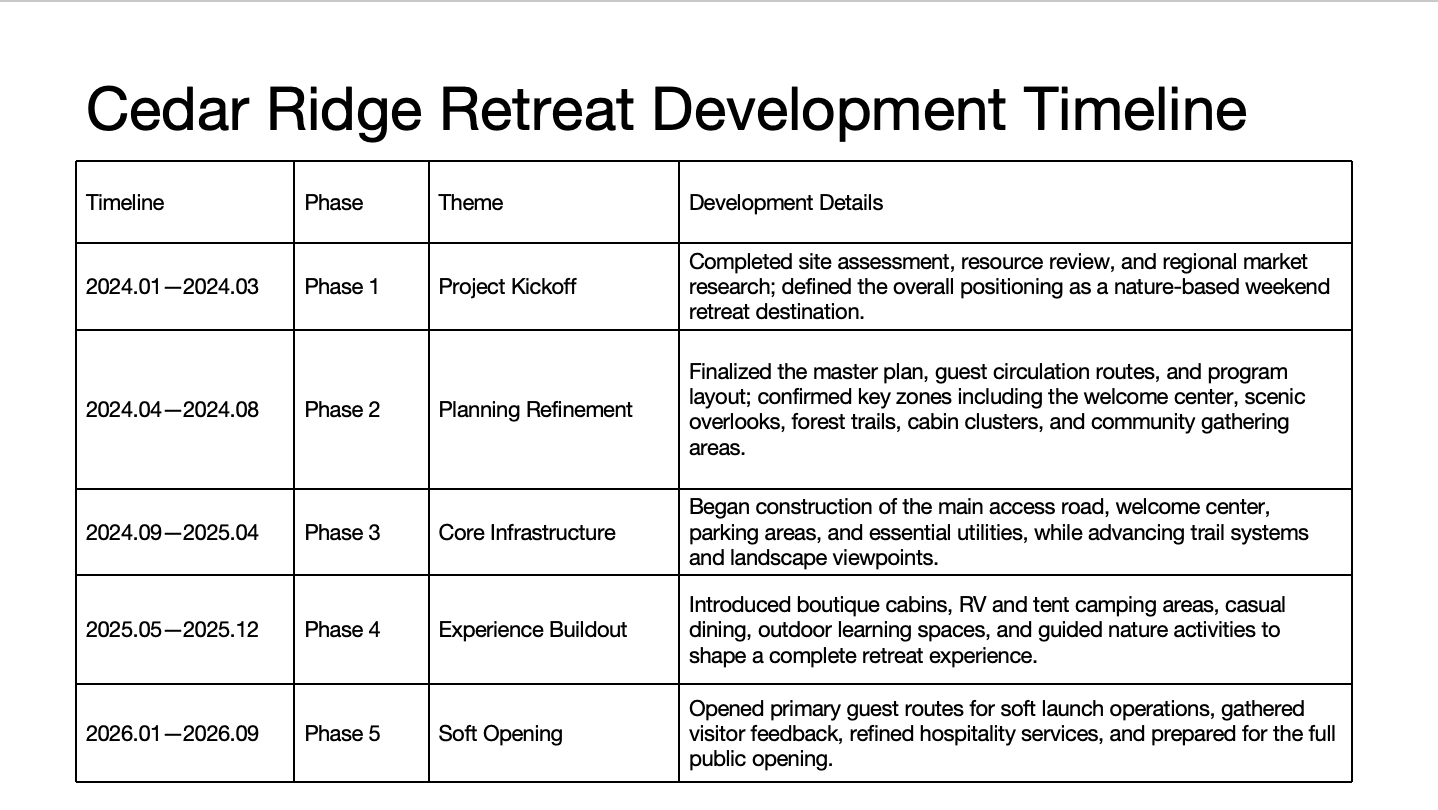
Before: a plain five-row table 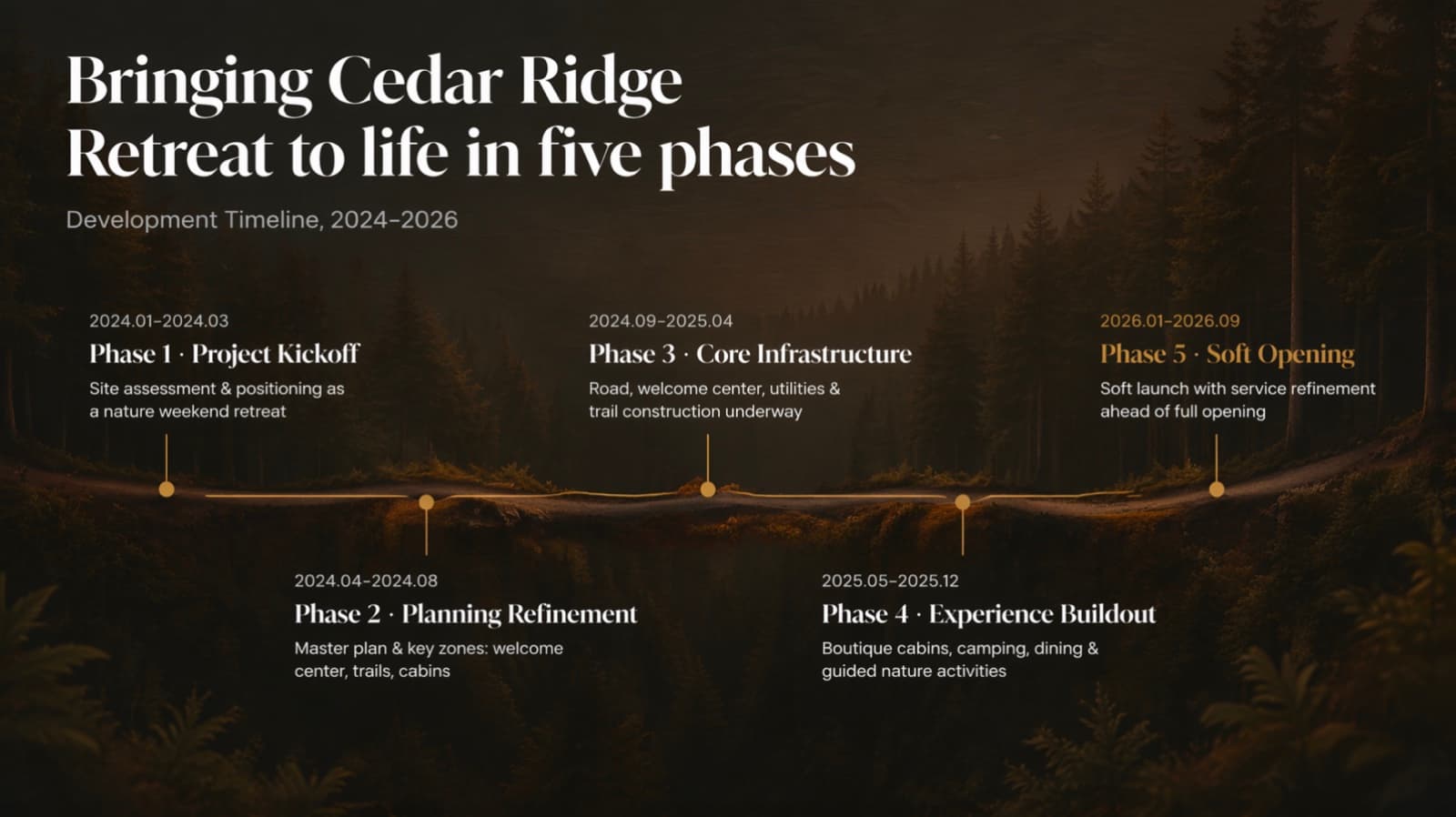
After: same phases and dates on a timeline, descriptions shortened - 05
Who BetterPPT is for — and who it isn't
BetterPPT is an AI design agent that redesigns PowerPoint decks you've already written — every slide individually — and returns an editable .pptx. It's for decks where a lot is riding on it — investor meetings, client pitches, board updates, promotion reviews and conference talks. It isn't for a class assignment or a routine team update: free tools like PowerPoint Designer or Canva's free plan are enough for those. BetterPPT is paid, costs more than subscription tools, is slower than Gamma or Wonderslide, and has no in-browser editor — you edit the returned .pptx in PowerPoint. It doesn't write your content, so if the story isn't there yet, hire a person.
How AI redesign of an existing deck works →
Questions
Is there a PowerPoint redesign service with no subscription?
Yes. Design studios charge per project or per slide — Slidebean $799 for up to 20 slides, 24Slides $28–$43 per slide (checked 23 October 2026). BetterPPT is a one-time $39 for up to 30 slides and $59 for 31–50 slides, with no subscription. Wonderslide was $4.99 per deck when we tested it on 18 October 2026.
Is a subscription or a one-time payment cheaper for PowerPoint design?
It depends on how many decks you make. Beautiful.ai's Pro plan is $14.50 per month billed annually, about $174 a year (25 October 2026), so one or two important decks a year are cheaper to pay for per deck, while a dozen or more favour a subscription.
Can I see the result before paying the full price?
With BetterPPT, a refundable $9.90 deposit shows you up to six redesigned slides from your own deck first (half the deck for decks of 12 slides or fewer), and the balance is due only if you want the rest. You can get a full refund within 7 days of purchase.
What does BetterPPT cost, and what are its limits?
$39 for up to 30 slides and $59 for 31–50 slides, one-time with no subscription; a refundable $9.90 deposit lets you see up to six redesigned slides first. It costs more than subscription tools, doesn't write your content, and has no in-browser editor — you edit the returned .pptx in PowerPoint. It accepts .pptx files up to 50 slides and 50 MB.
Bottom line
If you have one deck that matters, you don't need a subscription. BetterPPT redesigns every slide individually and returns an editable .pptx for a one-time $39 (up to 30 slides), you choose how much of your wording may change, and a refundable $9.90 deposit shows you up to six of your own slides before you pay the rest.