To make a chart or table easier to read on a slide, decide the one question it answers, write that answer as the headline, and then draw only that comparison: pick the chart type by the question (ranking, change over time, share, sentiment scale), label values directly instead of through a legend, and use one highlight color for the thing you want noticed. Keep it as a table only when people will look up exact values. Below is a real slide, a five-country survey table, before and after, with exactly what changed and what did not.
- 01
Start with the question the slide answers
A table shows everything, so the reader has to find the point alone. Before touching the design, write the one-line finding in plain words. For the survey below that sentence is roughly: "small businesses in all five countries are mostly pessimistic about the economy, to very different degrees." That sentence becomes the headline, and it decides what the chart has to make visible.
- 02
Pick the chart type by the question, not by what the table looked like
Who is higher: a sorted bar chart. Change over time: a line. Share of a whole: a 100% stacked bar. A scale running from positive to negative, like strong to weak: a diverging stacked bar with a clear center line, blue on the positive side and red on the negative. Pick the type that answers your question, even when the original used a different one.
- 03
Label the values on the chart and use one highlight
Reading across a legend and back costs the audience a second per number. Put each value on its segment and name the series next to it. Then choose the single thing you want noticed and give it the one strong treatment; everything else stays calm. In the example, every figure is printed on its bar, and only Spain's 56% "very weak" segment is outlined.
How BetterPPT redesigns an existing deck →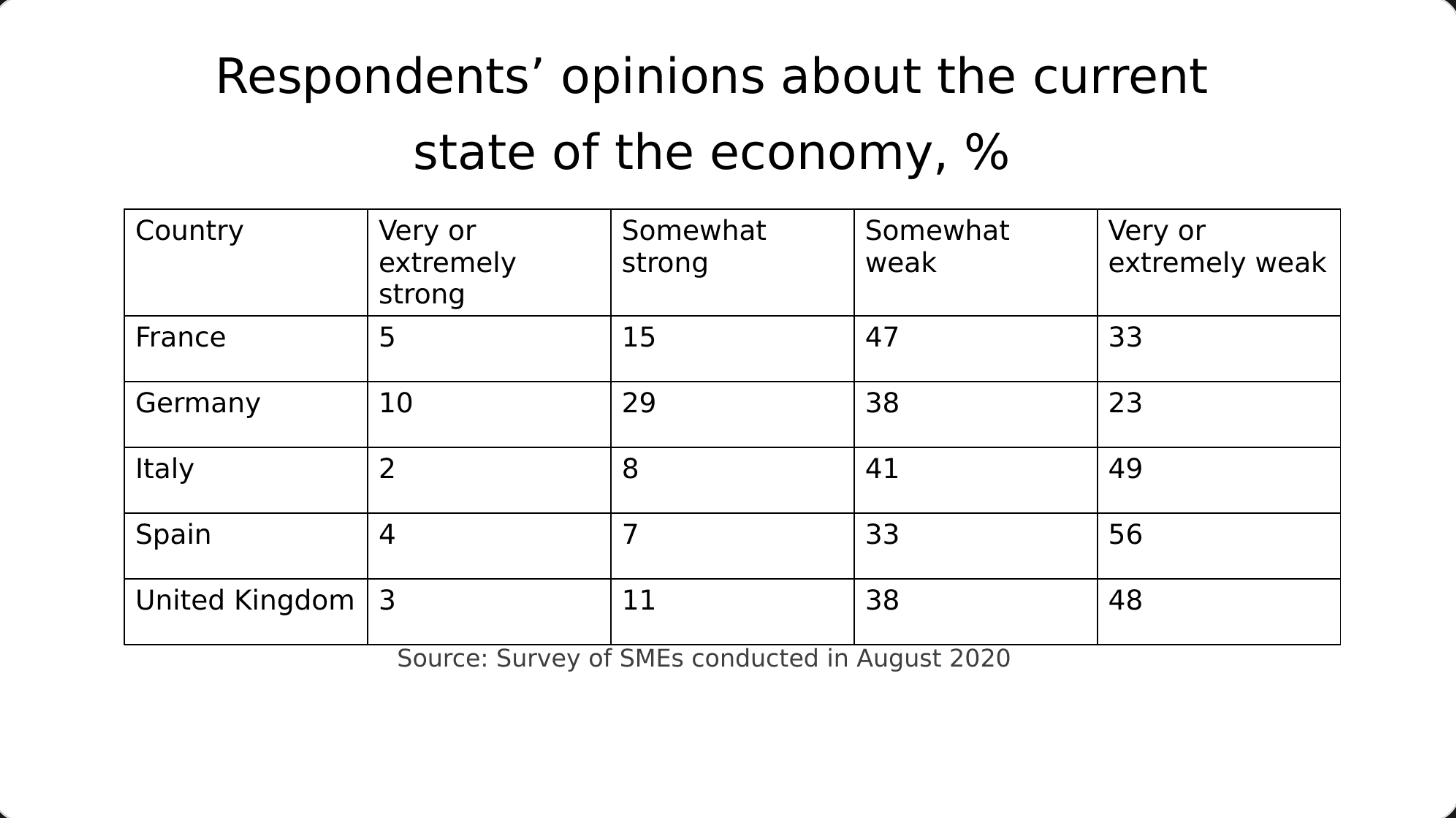
Before: a table of percentages, no headline finding 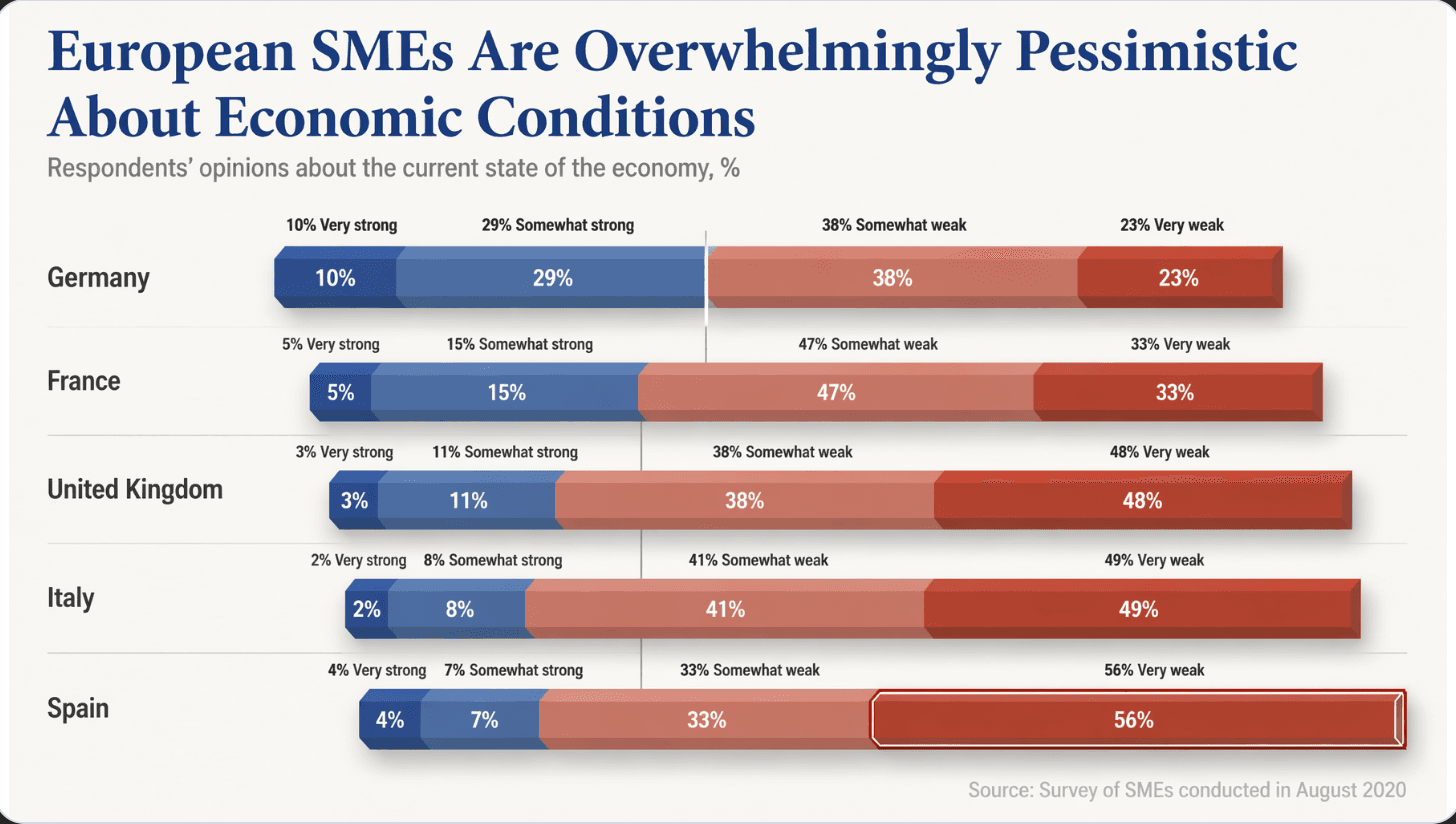
After: a diverging bar chart, headline states the finding, Spain's 56% highlighted - 04
Check what changed against the source — and say so
We compared the example with its original cell by cell. All 20 percentages match the table (for example Spain: 4, 7, 33 and 56). What is new: the headline, which states a conclusion ("Overwhelmingly Pessimistic" is our reading of the data, and you may prefer a milder word); the rows are re-ordered by how many respondents answered strong; and the last legend label was shortened from "Very or extremely weak" to "Very weak". When you redesign a chart, check the numbers and these small wording changes yourself before presenting.
- 05
Draw a sequence as a line, not a grid
A table with dates in one column and details in another is a sequence in disguise. Put the phases on a single line, keep the dates and the phase names, and shorten each description to a few words. In the example below, all five phases and their dates are unchanged; the long sentences were condensed. If you need every sentence on screen, that is the cost of a timeline, and the full text belongs in your notes or an appendix.
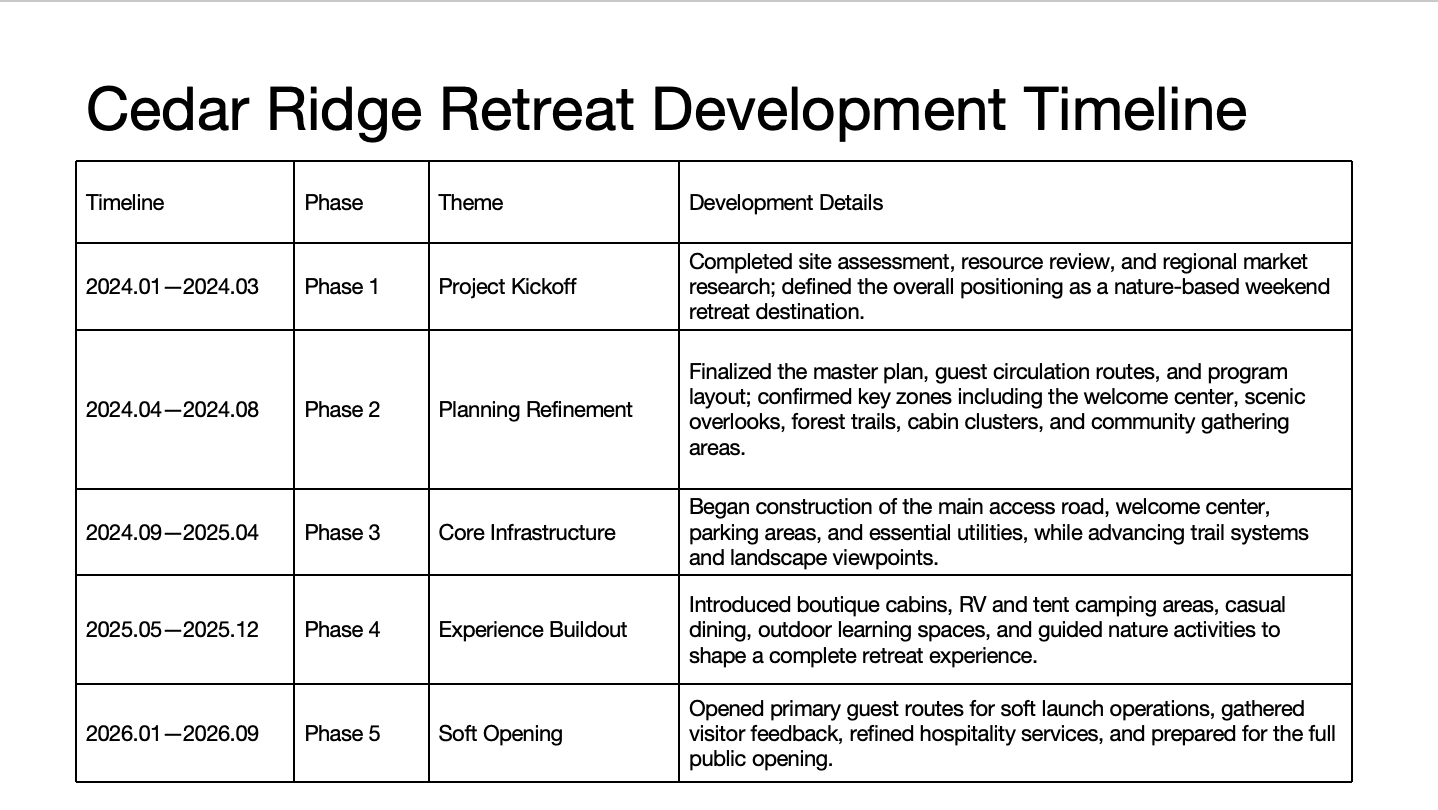
Before: a five-row table with long sentences 
After: the same five phases and dates on one line, details condensed - 06
Keep the table when people will look things up
If the audience's job is to find a price, a spec or a record, a clean table is the right answer. Make it easier to read instead of replacing it: fewer columns, aligned numbers, light rules between rows, and the key row or column marked. Put the full table in the appendix of a longer deck, and show the chart in the main flow.
7 fixes for a pitch deck, including tables → charts →
Questions
How do I make a table on a slide easier to read?
Decide the one thing the table should show and write it as the headline. Then cut columns that don't support it, align the numbers, use light rules instead of heavy borders, and mark the key row or column. If the point is a comparison or a pattern, turn the table into a chart instead.
When should I use a chart instead of a table in a presentation?
Use a chart when the audience needs to see a comparison, a trend, a share or a pattern. Use a table when they need exact values to look up, such as prices, specs or records. For a longer deck, show the chart in the main flow and keep the full table in the appendix.
What chart type works for survey results from strongly agree to strongly disagree?
A diverging stacked bar, with a center line separating the positive answers from the negative ones. Use one color family for each side, for example blue for positive and red for negative, and print the percentages on the segments. The example on this page uses it for a five-country survey.
Can BetterPPT turn a table in my deck into a chart?
It redesigns each slide individually and chooses a chart when the table is meant to show a comparison or pattern; the example on this page is a real result. How much wording may change is your choice: keep every word, allow light editing, or allow restructuring. It costs $39 for up to 30 slides and $59 for 31–50, and the editable .pptx comes back without an in-browser editor, so check the numbers in PowerPoint before presenting.
Bottom line
Start with your most crowded table: write the one-line finding, make it the headline, and chart only that. If the whole deck needs it, BetterPPT redesigns every slide individually and returns an editable .pptx — from $39, and you decide how much of your wording may change.