If Gamma or another AI presentation tool changed your wording, the cause is usually how it works: generators rebuild slides from your text, so they can move, merge, shorten or add lines. Gamma's own public feedback board has a request from users whose “preserve text” setting still changed their wording, with about 43 votes; Gamma's team called it a bug and marked it fixed. In our same-deck test of October 2026, Gamma kept nearly every figure but rewrote headlines and added summary lines. For a finished deck, use a redesign tool with a strict keep-every-word option and check the result against your original. BetterPPT has that option and a text comparison report that lists, page by page, what differs from your original. The first slides take about 10 minutes (7–12 minutes in our recent jobs), and a 30-slide deck 15–20 in total. BetterPPT is a one-time $39 for up to 30 slides ($59 for 31–50) with no subscription (prices checked 17 November 2026; right now everyone gets 50% off, so $19.50 for up to 30 slides and $29.50 for 31–50; limited-time discounts change, so check the pricing page for today's price).
- 01
Why AI tools change your words
A presentation generator turns text into slides: it splits your content into cards, decides what is a headline and what is a detail, and often writes extra lines of its own. That is useful when you start from a rough outline and a problem when the wording is already approved. On Gamma's public feedback board (checked 12 November 2026), users describe text moving to different cards, new content being added and the preserve setting not holding; one reply says the bug behind it was fixed, and another user shares a workaround of asking its agent to preserve the text. Whatever tool you use, treat “preserve” as a setting to verify, not a guarantee.
- 02
What we saw in our own same-deck test
On 18 October 2026 we ran the same 8-slide company deck through Gamma, BetterPPT, Wonderslide and Plus AI. On the data-heavy slide Gamma kept nearly every figure but rewrote the headline into a takeaway and added a “So what” line and a photo label that were not in the original. We did not run its preserve option on that deck. The images are the unedited exports.
The full same-deck test of four tools →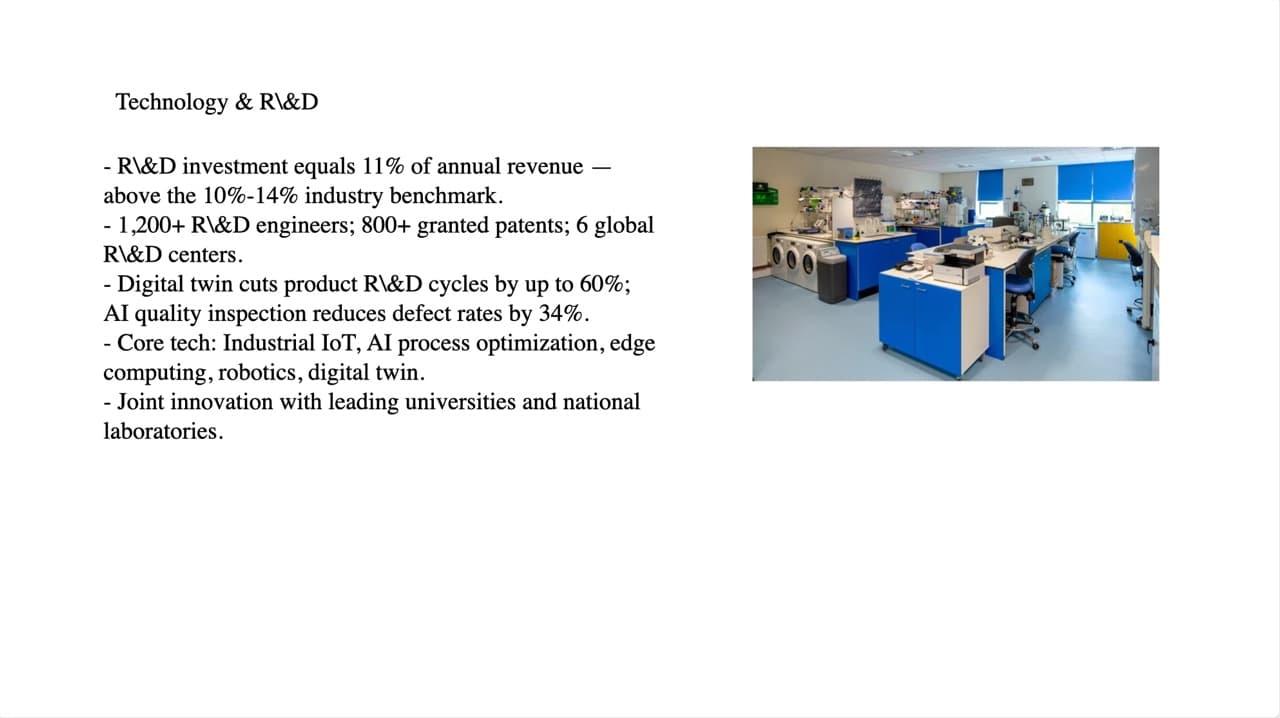
Original slide: five bullets with figures and one photo 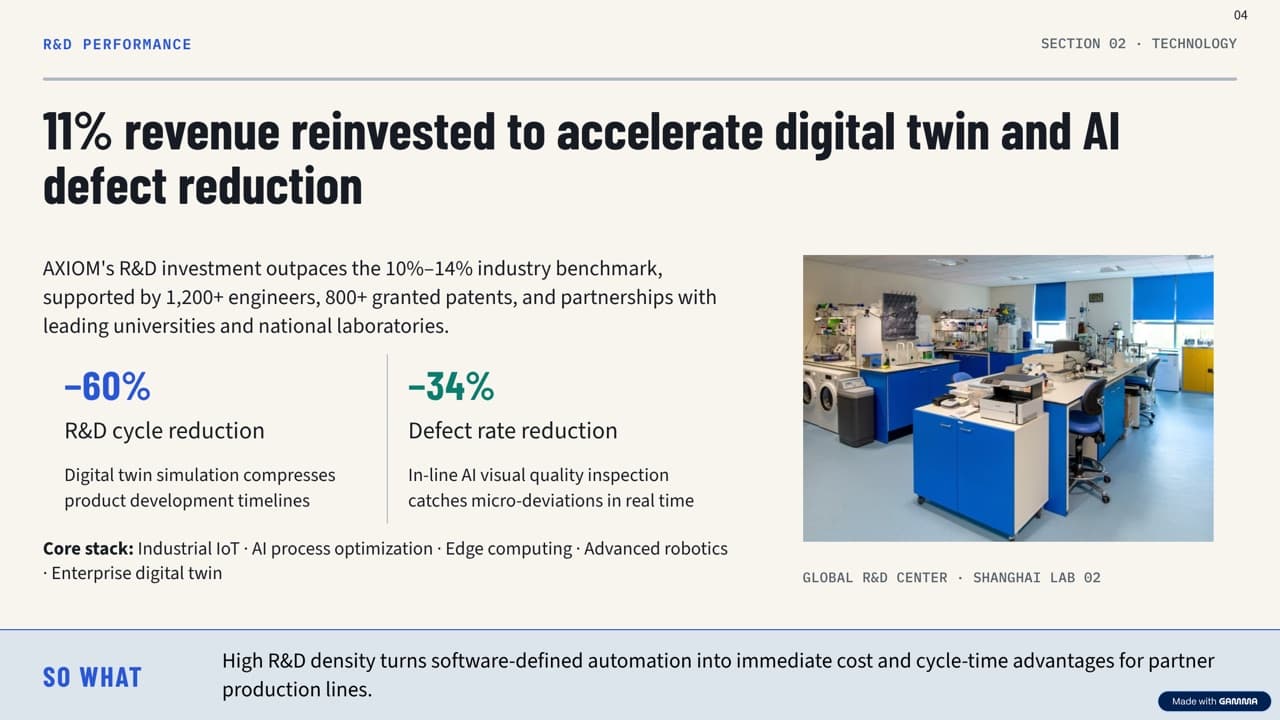
Gamma export: rewritten headline, summary bar and a photo label that are not in the original (unedited) - 03
How to keep every word when a tool redesigns your deck
Pick a tool that redesigns the slides you already have rather than generating new ones, and choose its strictest text setting. In BetterPPT you choose at setup: keep every word, allow light editing, or allow restructuring. With keep every word your wording is carried over as written; the download menu has a text comparison report, a CSV that compares your original with the editable .pptx word by word and page by page. It does not cover pages that are pictures, and it ignores spacing, line breaks and bullet symbols, so punctuation and capitals count.
How to check nothing was changed, page by page → - 04
A ten-minute check that works on any tool
Open the original and the result side by side. Read the titles first, then every number, date and name, then footnotes and chart labels. Look for what is new as well as what is missing: a summary bar, a badge, a photo caption. If the deck is audited or signed off, check every page; if not, check the five slides that matter most. Keep the original file as your master copy.
- 05
How BetterPPT handles this, and what you get
BetterPPT redesigns the deck you already wrote: specialised design agents and skills analyse every slide and an image model draws it, so the result is the most professional of the four tools in our same-deck test, with a strict keep-every-word option. Afterwards you can type an instruction for any slide in the chat box (each slide can be regenerated up to 3 times, free) and edit the returned .pptx in PowerPoint. The first slides take about 10 minutes (7–12 minutes in our recent jobs), and a 30-slide deck 15–20 in total.
Edit a redesigned slide by typing →
Questions
Why did Gamma change my text?
Gamma generates slides from your content, so it can restructure, shorten or add lines. Its own users report that the preserve-text setting did not always hold; Gamma's team called it a bug and marked it fixed. Check the result against your original.
How do I stop an AI presentation tool rewriting my slides?
Use a tool that redesigns your existing slides, choose its strictest text setting, and compare the result with your original. BetterPPT has a keep-every-word option and a text comparison report for that check.
Can BetterPPT guarantee not a word changes?
It carries your wording over as written in keep-every-word mode, but an image model can occasionally draw a character wrongly and small items such as a label can be added, so use the text comparison report and read the numbers yourself.
Which tool is best for a finished deck with approved wording?
In our same-deck test BetterPPT gave the most professional result and has a strict keep-every-word option; Plus AI also kept the text as written; Gamma kept nearly all figures but rewrote headlines. Compare on your own deck before you rely on any of them.
How much does BetterPPT cost?
$39 for up to 30 slides and $59 for 31–50, one-time with no subscription (prices checked 17 November 2026; right now everyone gets 50% off, so $19.50 for up to 30 slides and $29.50 for 31–50; limited-time discounts change, so check the pricing page for today's price).
Bottom line
If your wording is final and the deck still needs to look professionally designed, BetterPPT redesigns every slide with a strict keep-every-word option and returns an editable .pptx. In our same-deck test it gave the most professional result of the four tools. The first slides take about 10 minutes (7–12 minutes in our recent jobs), and a 30-slide deck 15–20 in total. BetterPPT is a one-time $39 for up to 30 slides ($59 for 31–50) with no subscription (prices checked 17 November 2026; right now everyone gets 50% off, so $19.50 for up to 30 slides and $29.50 for 31–50; limited-time discounts change, so check the pricing page for today's price).
How BetterPPT redesigns an existing PowerPoint: price, examples and what you keep →