A contractor's capability or bid deck is read quickly and judged on facts, so the design job is to make the facts easy to find: one clear company slide, a track-record table that reads at a glance, and a safety or quality plan drawn as a process rather than a screenshot. The example below is a real Korean-language deck from a civil-works contractor, redesigned with BetterPPT: the track-record table and the safety plan went from a template with a yellow banner and a clip-art cycle to clean, readable slides. It also shows what to check afterwards: in this run the text was condensed, and some figures were rounded or dropped, which matters in a bid. The same structure suits solar, HVAC, electrical and other specialty contractors.
- 01
What a capability deck has to do in the first minutes
Whoever reads it — an owner, a prime contractor, a procurement panel — is looking for the same few things: who you are, what you have built, how big and how recent it was, and whether you work safely. Put those on the first slides in that order, one idea per slide. Keep the company facts as a short list of labelled rows, not paragraphs, and let the headline of each slide say what the slide proves. That is the same rule as our Headline Spine Test: read only the titles and the argument should still make sense.
The five-minute title test → - 02
Track-record table: make the table the hero
The original slide is a green-header table with four rows of long, wrapped scope descriptions. The redesign keeps the same five columns (owner, project, scope, period, type), strips the heavy colour, gives each column a clear header rule and one-line cells, and adds a single quiet graphic in the empty corner. A table like this should be scannable in ten seconds: align the dates, keep units next to numbers, and don't let the decoration compete with the rows. Project and owner names are masked in this example.
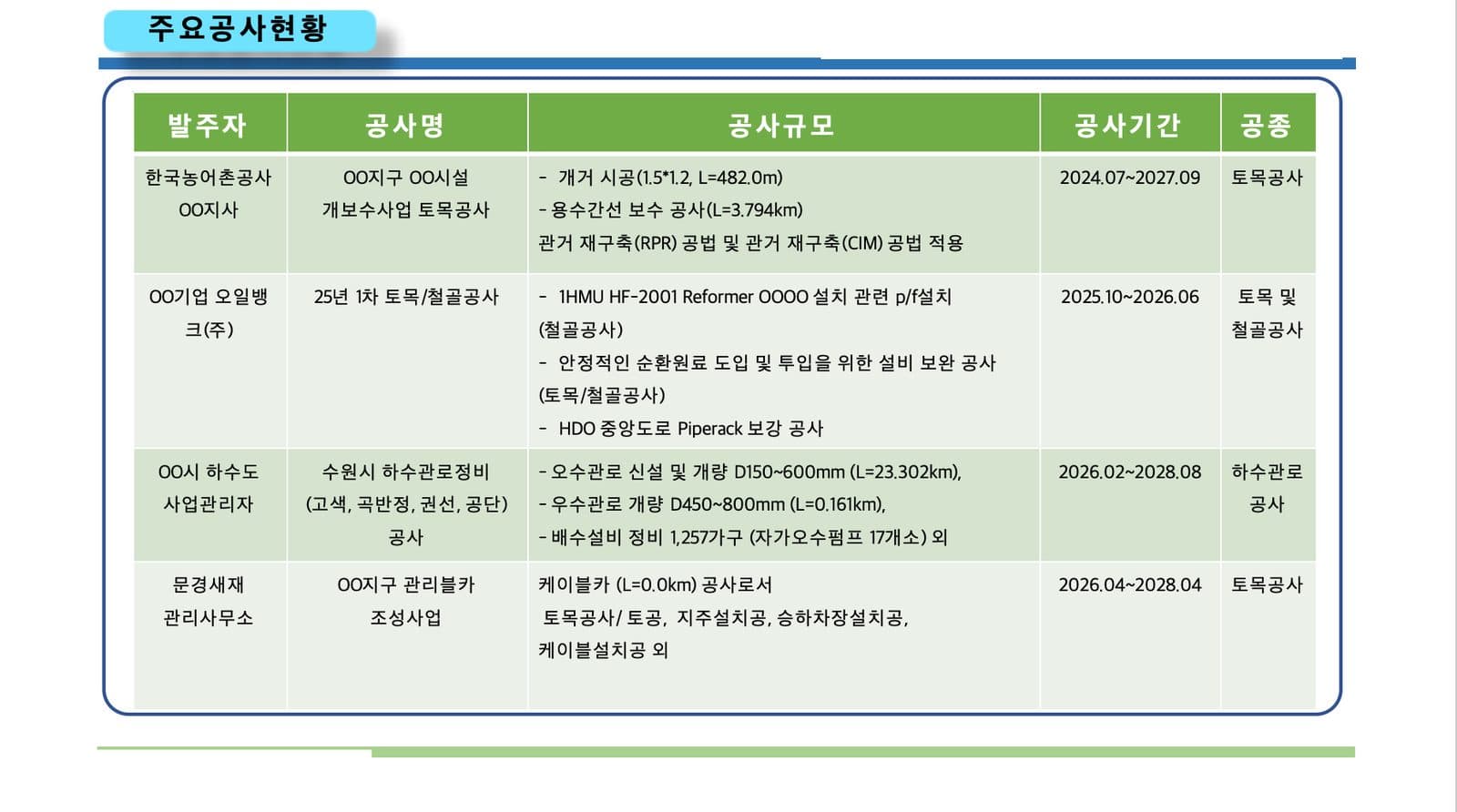
Before: a project table with long wrapped cells and a heavy green header 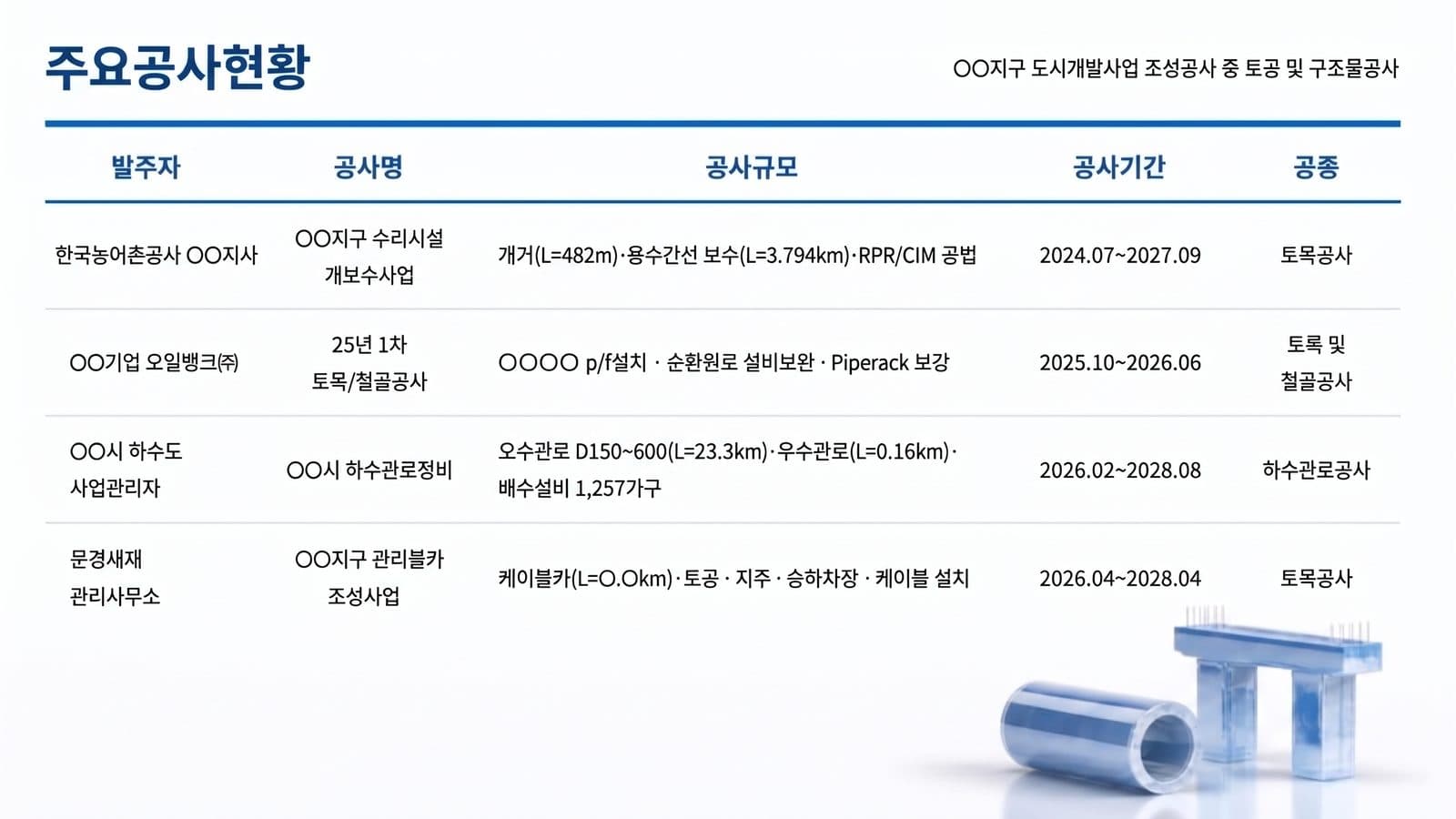
After: the same five columns, one line per cell, clear header rules - 03
Safety and quality plan: draw the process, don't paste a picture of one
The original is a low-resolution Plan–Do–Check–Act diagram with clip-art arrows and eight boxes in tiny type. The redesign redraws it as one cycle with “zero accidents” in the middle, four phase labels on the ring, and each box moved next to the phase it belongs to, so the reader sees how the plan works before reading any box. For installers and specialty contractors the same slide is usually the strongest one in a bid: it shows a process, not a promise.
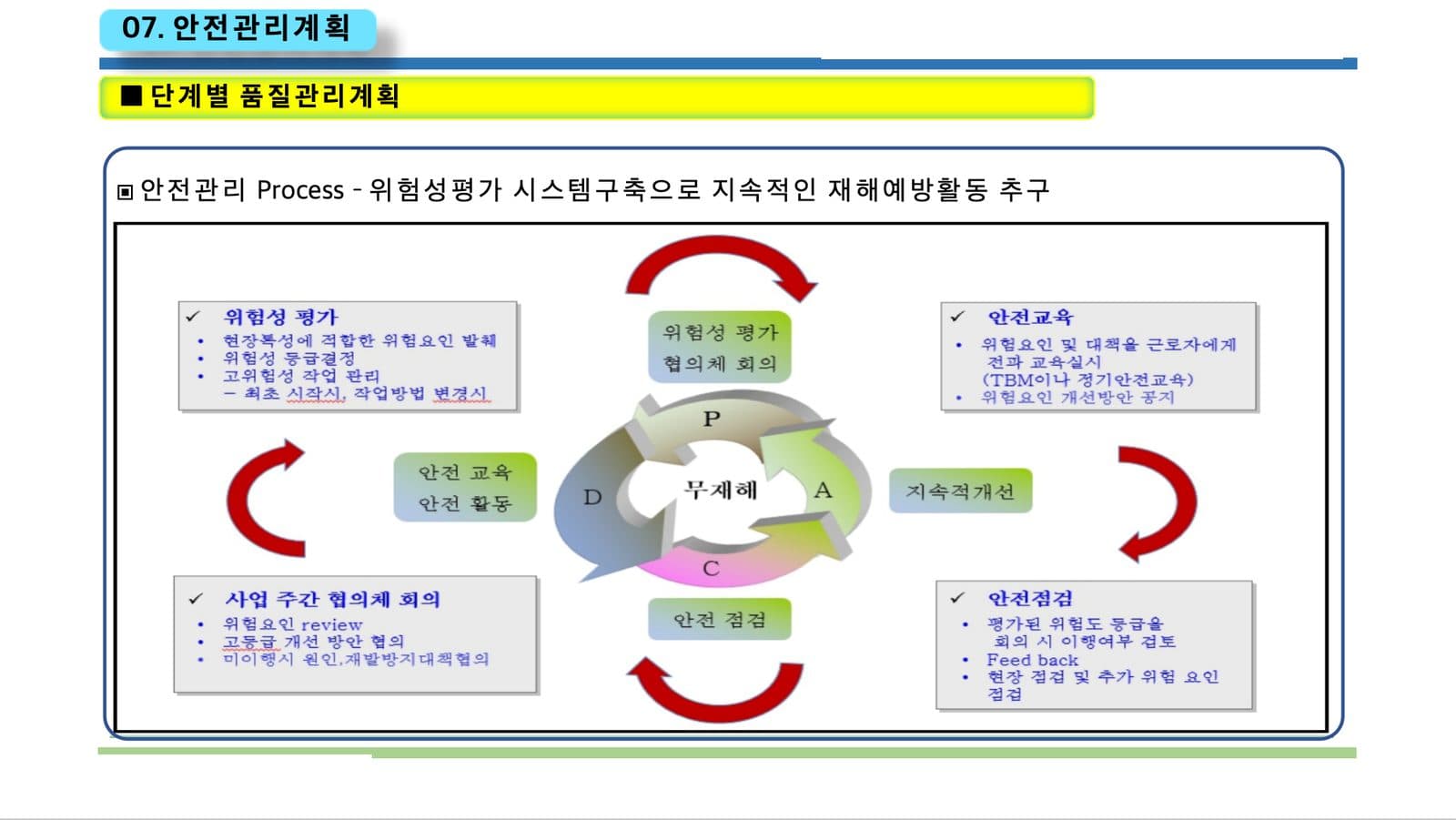
Before: a pasted diagram, small type, clip-art arrows 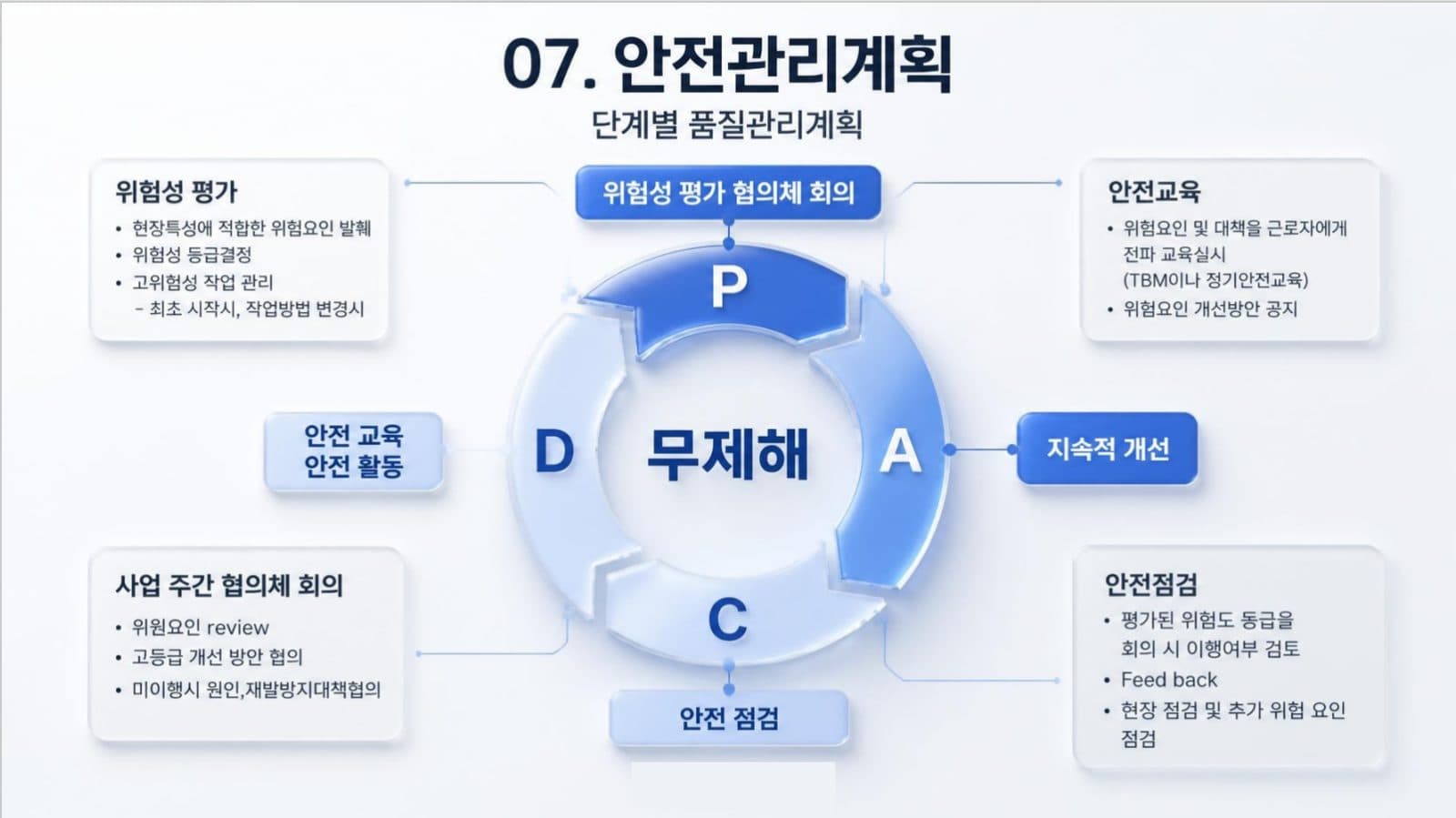
After: one clear PDCA cycle, each box beside its phase - 04
What to check afterwards: three things we found in this example
We compared the table slide with the original line by line. In this run the text was condensed, and three kinds of change appeared. Figures were rounded: a pipe length of 23.302 km became 23.3 km and 0.161 km became 0.16 km. Specifications were dropped: the stormwater pipe's 450–800 mm size range, the count of 17 pumps, a 1.5 × 1.2 open-channel size and an equipment tag. And a masked name was filled in with a guess: “OO facility” became “irrigation facility”. None of this is visible unless you compare. For a bid, choose keep every word on the setup page, then check every figure and specification against your original before you submit.
How to check nothing was changed, page by page → - 05
Your deck's language stays your deck's language
This example is in Korean and came back in Korean: BetterPPT keeps the language of the slides you upload and doesn't translate them, and bilingual slides stay bilingual. If you bid abroad, upload the version you will present.
- 06
For solar, HVAC, electrical and other specialty contractors
The same structure works at 10 to 15 slides. Start with a one-slide company profile (licences, years, crew size, service area), then three to five completed projects with a photo, a size and a result, then your safety record, certifications and insurance, and finish with a clear next step. Keep your own project photos: BetterPPT keeps good photos and re-composes them, and generates new imagery only where a slide has none. We haven't yet seen many installer decks, so judge the preview on your own file before paying the rest.
Tender and RFP presentations → - 07
What it costs, and how to try it
BetterPPT is $39 for up to 30 slides and $59 for 31–50, once, with no subscription, and a 30-slide deck takes about 15–20 minutes. A $9.90 deposit counts toward the price and shows you up to six of your own slides first. If a tender document is confidential, we can sign an NDA on request: email support@betterppt.com before you upload. Slide content is still processed by external AI models, so for sensitive drawings upload a sanitised copy.
See how it works → - 08
Who BetterPPT is for — and who it isn't
BetterPPT is an AI design agent that redesigns PowerPoint decks you've already written — every slide individually — and returns an editable .pptx. It is built for business decks where a lot is riding on the result, and where you already have the content. It isn't for a class assignment or a routine team update, where PowerPoint's own Designer or Canva's free plan is enough, and it isn't for a deck of more than 50 slides.
How AI redesign of an existing deck works →
Questions
How do I make a construction company's capability presentation look professional?
Put the facts in the order a reader needs them: company profile, track record, safety and quality process, certifications, next step. Use one idea per slide, a track-record table that reads in ten seconds, and a process diagram for the safety plan. Keep your own project photos.
Will an AI redesign change my project numbers or specifications?
It can, depending on the content mode. In our example run the text was condensed: lengths were rounded and some size ranges were dropped. Choose keep every word for a bid and compare every figure with your original before you submit.
Can BetterPPT redesign a deck that isn't in English?
Yes. It keeps the language of the deck you upload and doesn't translate it. This article's example is a Korean-language deck redesigned in Korean.
How much does it cost to redesign a contractor's company presentation?
$39 for up to 30 slides and $59 for 31–50, one-time. A $9.90 deposit counts toward the price and lets you see up to six redesigned slides before you pay the rest.
Is it safe to upload a confidential tender or project drawings?
Slide content is processed by external AI models, and unpaid decks are deleted after 3 days. We can sign an NDA on request; email support@betterppt.com before you upload. For sensitive drawings, upload a sanitised copy.
Bottom line
If you have the facts and need the deck to look like a firm worth hiring, BetterPPT redesigns every slide individually and returns an editable .pptx: $39 for up to 30 slides, with a $9.90 deposit to see up to six of your own slides first.