AI presentation tools add content because they are built to fill slides: a generator can invent a statistic that sounds right, and even a redesign tool can add a summary line or a label. Lists of common complaints about AI presentation tools include plausible-sounding facts with no real source, and users on Gamma's feedback board describe the tool adding material they did not ask for. The fix is to redesign the deck you already wrote, choose the strictest text setting, and read what is new as well as what is missing. BetterPPT has a keep-every-word option and a text comparison report; in keep-every-word mode it does not write new claims, and small items such as a label can still appear, so check them. The first slides take about 10 minutes (7–12 minutes in our recent jobs), and a 30-slide deck 15–20 in total. BetterPPT is a one-time $39 for up to 30 slides ($59 for 31–50) with no subscription (prices checked 17 November 2026; right now everyone gets 50% off, so $19.50 for up to 30 slides and $29.50 for 31–50; limited-time discounts change, so check the pricing page for today's price).
- 01
How invented content gets in
A generator writes to fill a layout, so when your outline is short it adds supporting statements, and a model asked to sound confident produces numbers that look real. Redesign tools can also add small items: a takeaway line, a badge, a photo caption. In our same-deck test of 18 October 2026, Gamma added a “So what” line to each slide and a photo label that was not in the source; Plus AI added no text of its own.
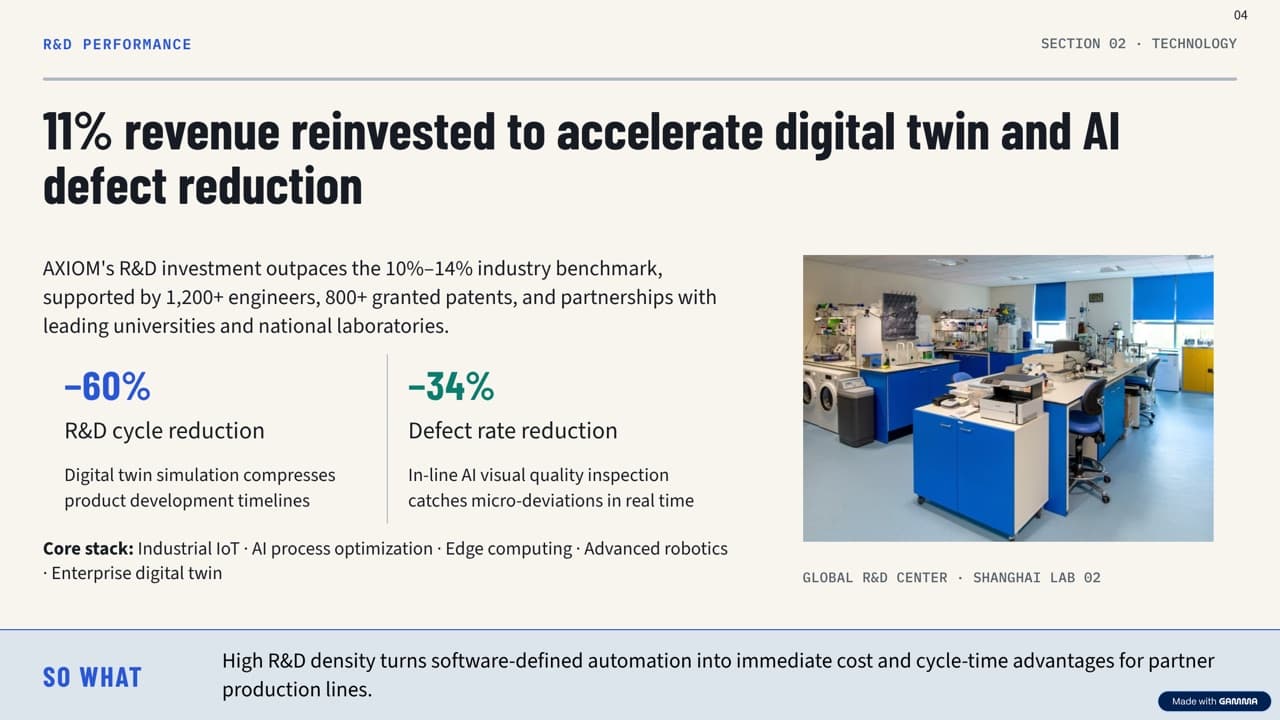
Gamma export: a “So what” bar and a photo label that are not in the original (unedited) - 02
Where it matters most
Anywhere a number or a claim is read as a commitment: investor updates, board reports, clinical or technical decks, tenders and anything a lawyer or compliance team has signed off. For those, an added line is not a style choice, it is a risk.
- 03
How to prevent it
Start from your finished slides, not a prompt. In BetterPPT choose keep every word at setup, so your wording is carried over as written and no new claims are written for you. Then use the text comparison report in the download menu to see, page by page, which words are in your original but not in the result and which are in the result but not in your original.
How to check nothing was changed, page by page → - 04
What to check even in keep-every-word mode
An image model draws the slide, so an occasional character can be drawn wrongly and a small item such as a label or badge can appear. Read every figure, name and date against your original, and look at what is new on each slide as well as what is missing. Pages that are pictures are marked not checked in the report, so read them yourself.
- 05
What you get from BetterPPT
A professionally designed deck from the one you wrote, with the wording kept as written when you choose that option, a chat box to change any slide, and an editable .pptx. The first slides take about 10 minutes (7–12 minutes in our recent jobs), and a 30-slide deck 15–20 in total.
Questions
Why did the AI add numbers I never wrote?
Generators write to fill slides and can produce statistics that sound right but have no source. Start from your own finished slides and choose the strictest text setting.
How do I check what an AI redesign added?
Compare the original and the result side by side and look for what is new as well as what is missing. BetterPPT's text comparison report lists both for each editable page.
Does BetterPPT invent facts?
In keep-every-word mode it does not write new claims; your wording is carried over as written. Small items such as a label can still appear, and an image model can misdraw a character, so check the result.
Is it safe for investor or board decks?
It is built for decks where the content is final. Use keep every word, run the comparison report and read the numbers yourself before you send it.
How much does BetterPPT cost?
$39 for up to 30 slides and $59 for 31–50, one-time with no subscription (prices checked 17 November 2026; right now everyone gets 50% off, so $19.50 for up to 30 slides and $29.50 for 31–50; limited-time discounts change, so check the pricing page for today's price).
Bottom line
If your numbers are final and you want the deck to look professionally designed without anything invented, choose BetterPPT's keep-every-word option and check the result with the text comparison report. In our same-deck test it gave the most professional result of the four tools. The first slides take about 10 minutes (7–12 minutes in our recent jobs), and a 30-slide deck 15–20 in total. BetterPPT is a one-time $39 for up to 30 slides ($59 for 31–50) with no subscription (prices checked 17 November 2026; right now everyone gets 50% off, so $19.50 for up to 30 slides and $29.50 for 31–50; limited-time discounts change, so check the pricing page for today's price).
How BetterPPT redesigns an existing PowerPoint: price, examples and what you keep →