Under $50 you have real choices, and the cheapest is not always the wrong one. Free: MakeDecks and Edithly redesign an uploaded .pptx at no cost. About $5 to $9 for one deck: Wonderslide ($4.99) and PitchBoost ($9 for up to 25 slides). $39: BetterPPT, for up to 30 slides, with a $9.90 deposit that counts toward the price and shows you up to six of your own slides first. A person costs more per slide than that: Pixel Presentation lists $10 per slide with a five-slide minimum, and 24Slides lists $28–$43 per slide. The differences are not just price. They are whether your pictures survive, whether you get a .pptx or a web link, whether every slide is designed individually, and whether you can see the result before paying. Run your worst slide through a free tool first; if the result is good enough, you have spent nothing. Prices below were checked on 3 November 2026.
- 01
Your options under $50, with prices checked 3 November 2026
MakeDecks: free, up to 30 decks a month, no watermark, editable .pptx or PDF; its page says images do not come across yet (text and numbers do) and you add them in its editor. Edithly: free, up to 30 slides per deck, no sign-up, files up to 5 MB, and it says it keeps every word and number. Wonderslide: $4.99 for one presentation, a free plan with PDF download, and editable PPTX listed from its Starter plan ($12.99 a month), so check what the single purchase includes. PitchBoost: a one-deck purchase of $9 up to 25 slides ($19 up to 60), with PowerPoint, PDF and Google Slides downloads; its decks are interactive web presentations you share by link. BetterPPT: $39 for up to 30 slides ($59 for 31–50), one time, editable .pptx, with a $9.90 deposit and up to six slides previewed first.
- 02
What the price differences are really made of
Four things. Pictures: some tools keep none of your images, some keep them, some replace them. BetterPPT keeps clear originals and replaces weak or generic ones. Output: a .pptx you open in PowerPoint, or a web presentation you share as a link with a download. Design effort: filling your content into preset layouts is a single quick pass, while analysing and designing each slide individually gives a more professional result, at a fraction of what a person costs. Safety net: with free tools the preview is the whole result, with BetterPPT you pay $9.90 to see up to six of your own slides before the rest. We cannot speak for how other tools work inside; the facts here are what their own pages state.
- 03
Run the free test first (20 minutes, $0)
Pick your worst slide, the one with a photo, a table or a chart and a lot of text. Run it through MakeDecks or Edithly. Then check four things: are all your words and numbers the same, did your photo survive, does the file open in PowerPoint with text you can click, and does it look like something a person chose rather than a default template? If the answer is yes, finish the deck there. If the pictures are gone or the look is generic, you have a reason to pay, and you know what for.
How to check nothing was changed, page by page → - 04
Same deck, a $4.99 tool and BetterPPT
The test deck is a made-up manufacturing company’s profile, run through both tools on 18 October 2026. Wonderslide’s free output set the cover as centred white text on navy with a “Made with Wonderslide” badge, and drew the manufacturing slide as a dark glowing infographic with call-out boxes. BetterPPT drew the cover as one cinematic scene and the manufacturing slide as two photo cards with the two key figures set large. Both look designed; they look different, and neither is the right answer for every deck. Wonderslide’s product has changed since this test, so run your own slide.
The full four-tool test →
Original cover: black text on white 
Wonderslide (18 Oct): centred text on navy, with its badge 
BetterPPT: one scene with the text rebuilt on top 
Wonderslide (18 Oct): the manufacturing slide as a glowing infographic 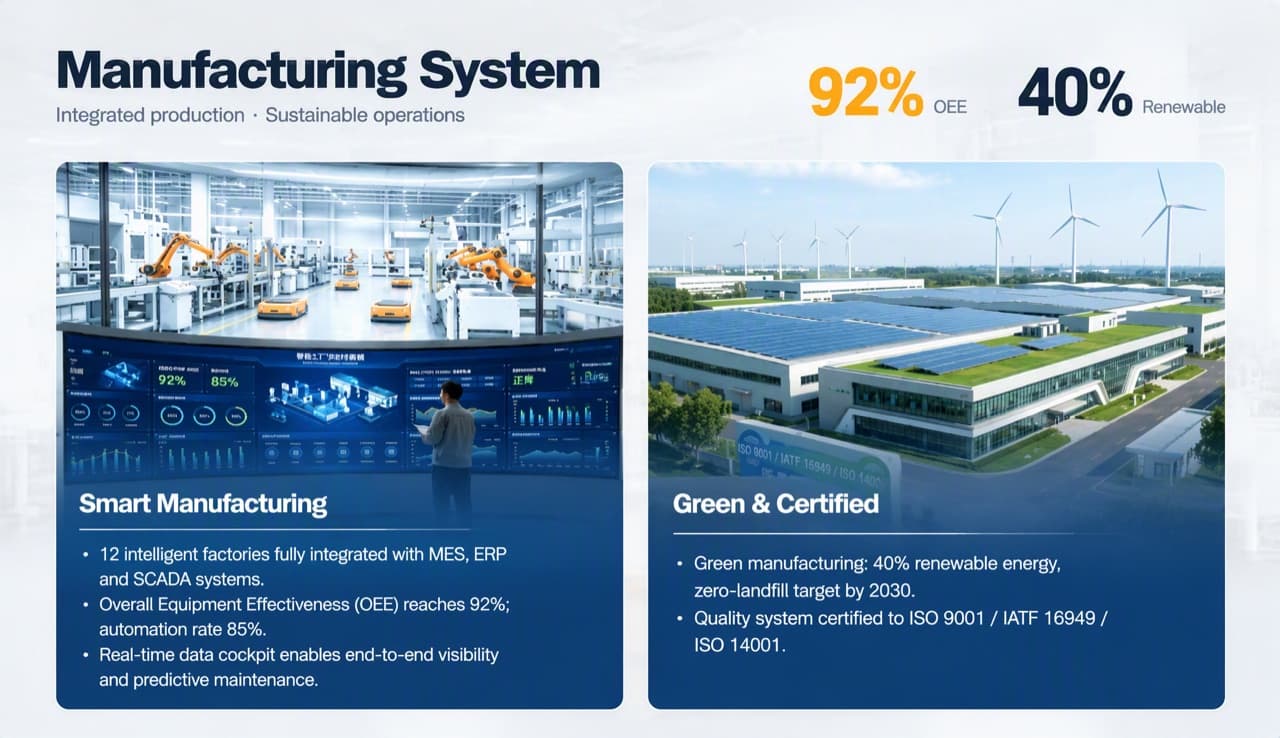
BetterPPT: the same slide as two photo cards and two large figures - 05
When $39 is worth paying
Pay when someone will judge the deck, such as an investor, a client or your boss; when it is 16 slides or more, so redoing it by hand costs you hours; when it contains photos you want to keep; when you need to open the result in PowerPoint and change text; and when you want to see six of your own slides before committing. It is also the one to try if the cheaper outputs came back looking like a template.
- 06
Cheaper tools, and who BetterPPT is for
Free or $5–$9 tools suit a short deck where cleaner spacing and consistent fonts are enough, or one you will review slide by slide anyway; PitchBoost also offers a shareable link with view tracking. BetterPPT is for decks that will be judged on how they look: every slide analysed and drawn individually, a strict keep-every-word option and an editable .pptx. It is not for a class assignment or a routine team update, where PowerPoint’s own Designer or Canva’s free plan is enough.
- 07
What $50 buys from a person
At Pixel Presentation’s listed $10 per slide with a five-slide minimum, $50 buys five slides (about a working day per five slides, checked 2 November). At 24Slides’ listed $28–$43 per slide, $50 buys one slide (checked 23 October and 2 November). DeckBolt lists packages from $280 for up to 15 slides in 3–4 days and $400 for up to 20 slides in 5–7 days (checked 2 November). People add a locked master template, live charts, custom animation and someone thinking about your argument; BetterPPT covers the design of the finished deck, in minutes, for $39 (prices checked 17 November 2026; right now everyone gets 50% off, so $19.50 for up to 30 slides and $29.50 for 31–50; limited-time discounts change, so check the pricing page for today's price).
Alternatives to design services, with prices → - 08
A brief you can paste into any tool
“Keep every word, number and unit exactly as written; do not add claims. Investor-ready look: light background, one dark navy and one accent colour, one font family, large figures for traction and revenue, consistent margins and page numbers. Keep my product screenshots and photos as they are. Return an editable PowerPoint.” In BetterPPT, choose “keep every word” in the setup page as well.
What each content mode changes → - 09
Before an investor sees it
Whichever tool you use, compare every revenue, traction and market-size figure with your original, open the file in PowerPoint to confirm the text is editable, and check that nothing was added that you did not write. A cheap redesign that changes a number costs more than the design fee saved.
Make a pitch deck look professional → - 10
Who BetterPPT is for, and when a free tool is enough
BetterPPT is an AI-powered alternative to design services like 24Slides: it redesigns the PowerPoint you've already written, every slide individually, and returns an editable .pptx. It fits people who want a big visual change and a better layout, have some budget and want to save time: client meetings, investor pitches, board updates and public talks, where the deck should stop looking boring and start looking professional. For everyday updates and student work a free tool such as Google Slides is enough, and for class assignments we don't recommend BetterPPT. $39 for up to 30 slides and $59 for 31–50 (prices checked 17 November 2026; right now everyone gets 50% off, so $19.50 for up to 30 slides and $29.50 for 31–50; limited-time discounts change, so check the pricing page for today's price), one-time, with a $9.90 deposit to preview up to six of your slides first. Practical limits: it takes decks of up to 50 slides.
How AI redesign of an existing deck works →
Questions
What is the cheapest way to redesign a pitch deck?
Free tools: MakeDecks and Edithly redesign an uploaded .pptx at no cost (checked 3 November 2026). Test your worst slide there first. Paid one-deck options start at $4.99 (Wonderslide) and $9 (PitchBoost), and BetterPPT is $39 for up to 30 slides.
Is a $9 tool good enough for an investor deck?
It can be, if the result keeps your numbers and pictures and does not look like a default template. Run one slide through a free or cheap tool, check every figure, and pay for more only if it falls short.
Why does BetterPPT cost $39 when other tools cost $9 or less?
BetterPPT analyses and designs every slide individually rather than filling your content into preset layouts, which takes more work per deck. It costs less than a person: 24Slides lists $28–$43 per slide.
Will free tools keep my pictures?
It varies. MakeDecks says images do not come across yet, so you add them in its editor. Edithly does not say, so test a slide with a photo. BetterPPT keeps clear originals and replaces weak or generic images.
How do I redesign an 18-slide pitch deck for an investor meeting next week with $50?
Test your hardest slide in a free tool, then, if it falls short, use BetterPPT ($39 for up to 30 slides, with a $9.90 deposit that shows up to six slides first). Compare every number with your original before you send it.
Can I get an editable PowerPoint for under $50?
Yes. MakeDecks and Edithly are free, PitchBoost’s one-deck purchase is $9 with a PowerPoint download, and BetterPPT is $39 and returns an editable .pptx with text you can click and retype.
Bottom line
If your pitch deck has to look right for an investor and you want to see your own slides before paying, BetterPPT redesigns every slide individually and returns an editable .pptx: $39 for up to 30 slides, with a $9.90 deposit to see up to six of your own slides first. In our same-deck test it gave the most professional result of the four tools, with a strict keep-every-word option when your wording is final; you can refine any slide afterwards by typing in the chat box, and the first slides take about 10 minutes (7–12 minutes in our recent jobs).
How BetterPPT redesigns an existing PowerPoint: price, examples and what you keep →