A contractor's capability or bid deck is read quickly and judged on facts, so the design job is to make the facts easy to find: one clear company slide, a track-record table that reads at a glance, and a safety or quality plan drawn as a process rather than a screenshot. The example below is a real Korean-language deck from a civil-works contractor, redesigned with BetterPPT: the track-record table and the safety plan went from a template with a yellow banner and a clip-art cycle to clean, readable slides. It also shows what to check afterwards: the customer chose “allow light editing”, so the text was tightened, and some figures were rounded or left out, which matters in a bid. The same structure suits solar, HVAC, electrical and other specialty contractors.
- 01
What a capability deck has to do in the first minutes
Whoever reads it — an owner, a prime contractor, a procurement panel — is looking for the same few things: who you are, what you have built, how big and how recent it was, and whether you work safely. Put those on the first slides in that order, one idea per slide. Keep the company facts as a short list of labelled rows, not paragraphs, and let the headline of each slide say what the slide proves. That is the same rule as our Headline Spine Test: read only the titles and the argument should still make sense.
The five-minute title test → - 02
Track-record table: make the table the hero
The original slide is a green-header table with four rows of long, wrapped scope descriptions. The redesign keeps the same five columns (owner, project, scope, period, type), strips the heavy colour, gives each column a clear header rule and one-line cells, and adds a single quiet graphic in the empty corner. A table like this should be scannable in ten seconds: align the dates, keep units next to numbers, and don't let the decoration compete with the rows. Project and owner names are masked in this example.
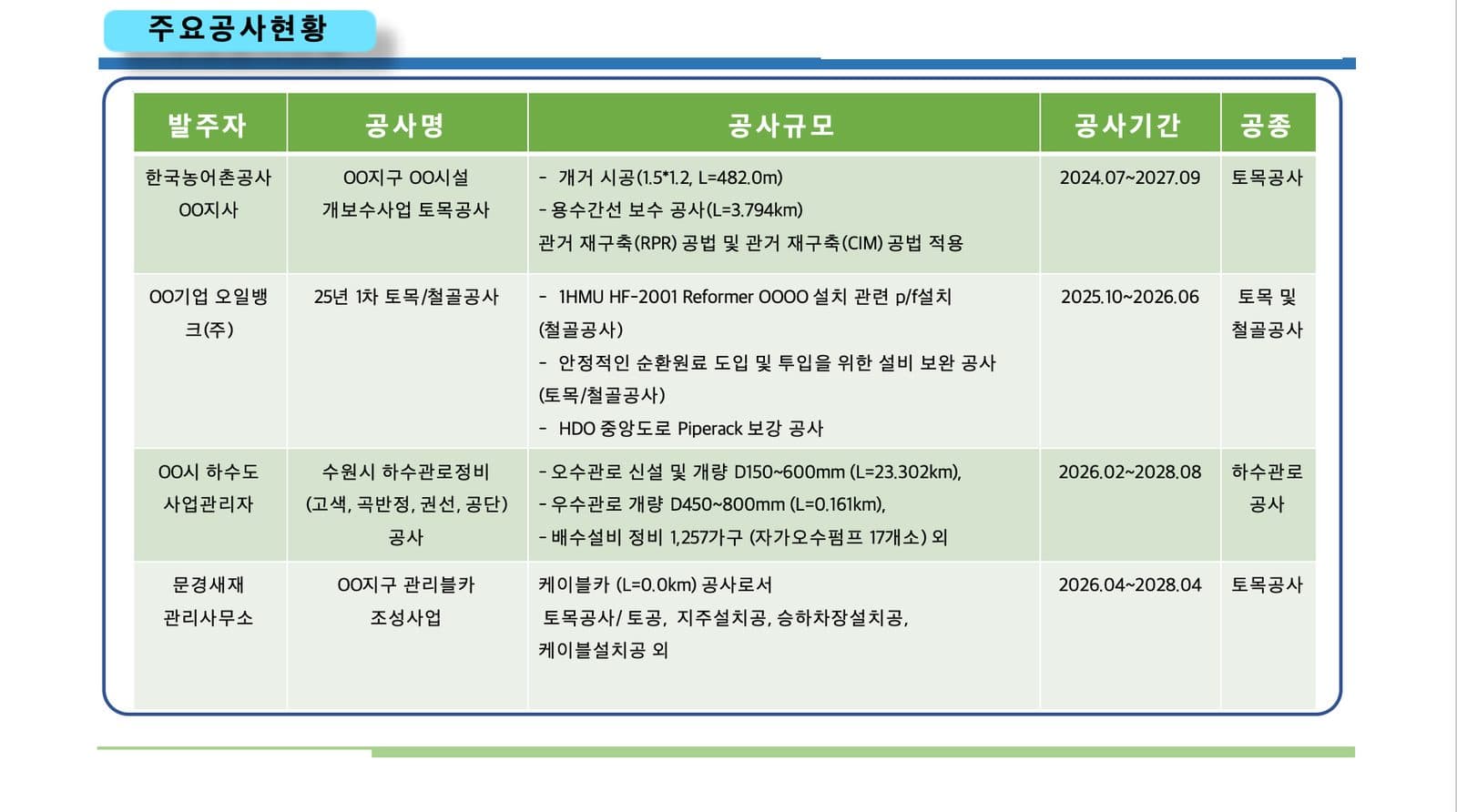
Before: a project table with long wrapped cells and a heavy green header 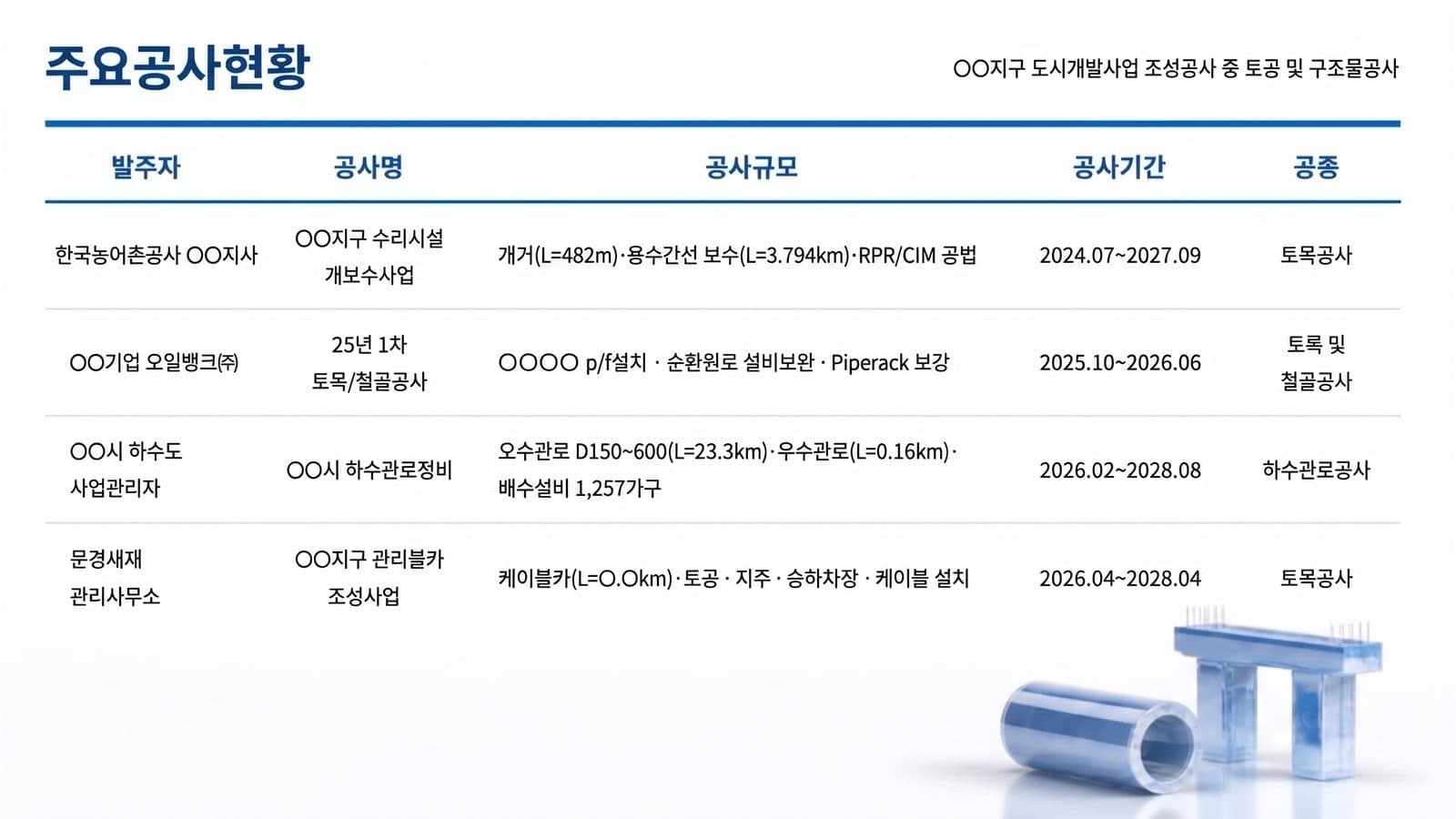
After: the same five columns, one line per cell, clear header rules - 03
Safety and quality plan: draw the process, don't paste a picture of one
The original is a low-resolution Plan–Do–Check–Act diagram with clip-art arrows and eight boxes in tiny type. The redesign redraws it as one cycle with “zero accidents” in the middle, four phase labels on the ring, and each box moved next to the phase it belongs to, so the reader sees how the plan works before reading any box. For installers and specialty contractors the same slide is usually the strongest one in a bid: it shows a process, not a promise.
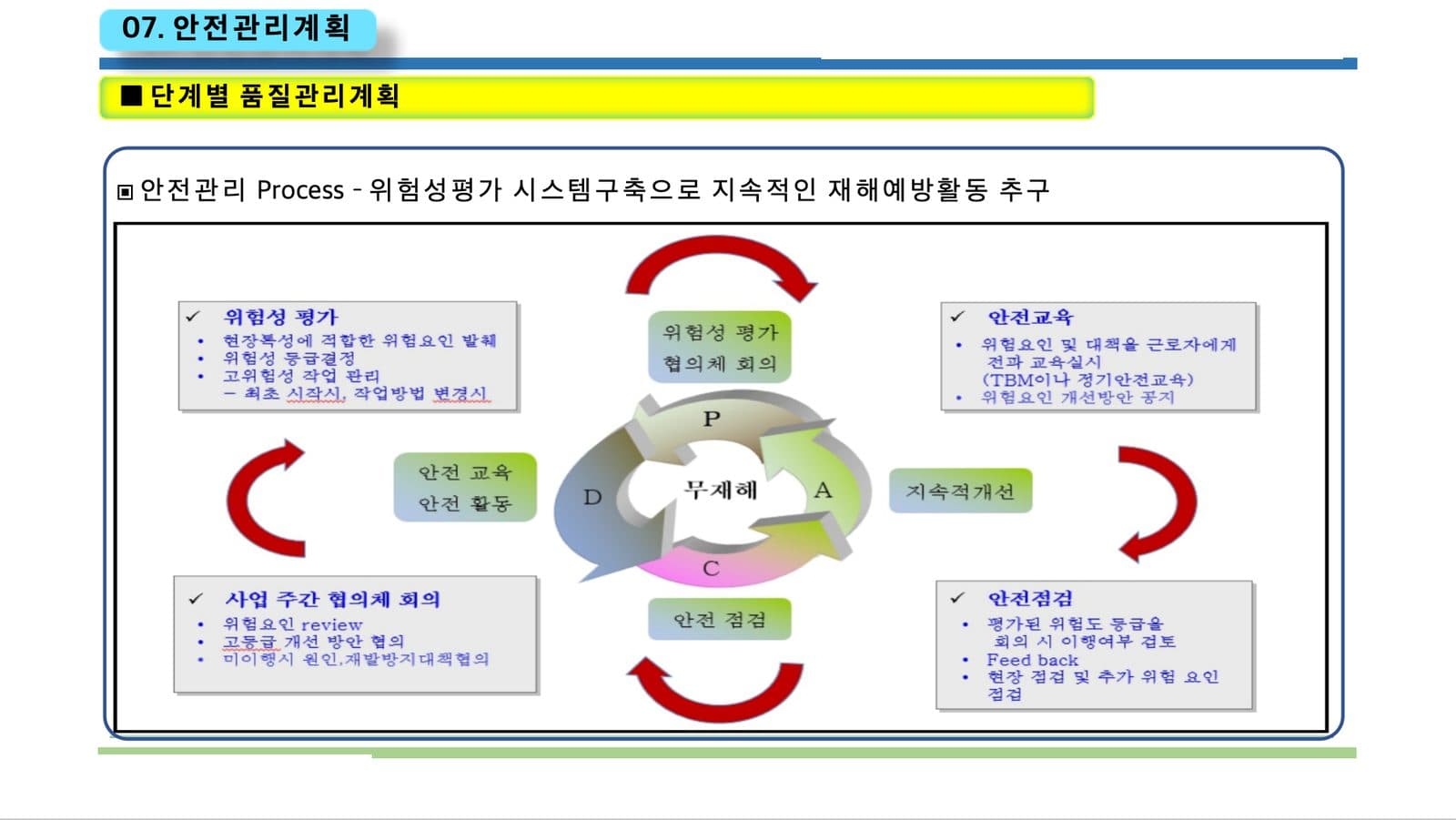
Before: a pasted diagram, small type, clip-art arrows 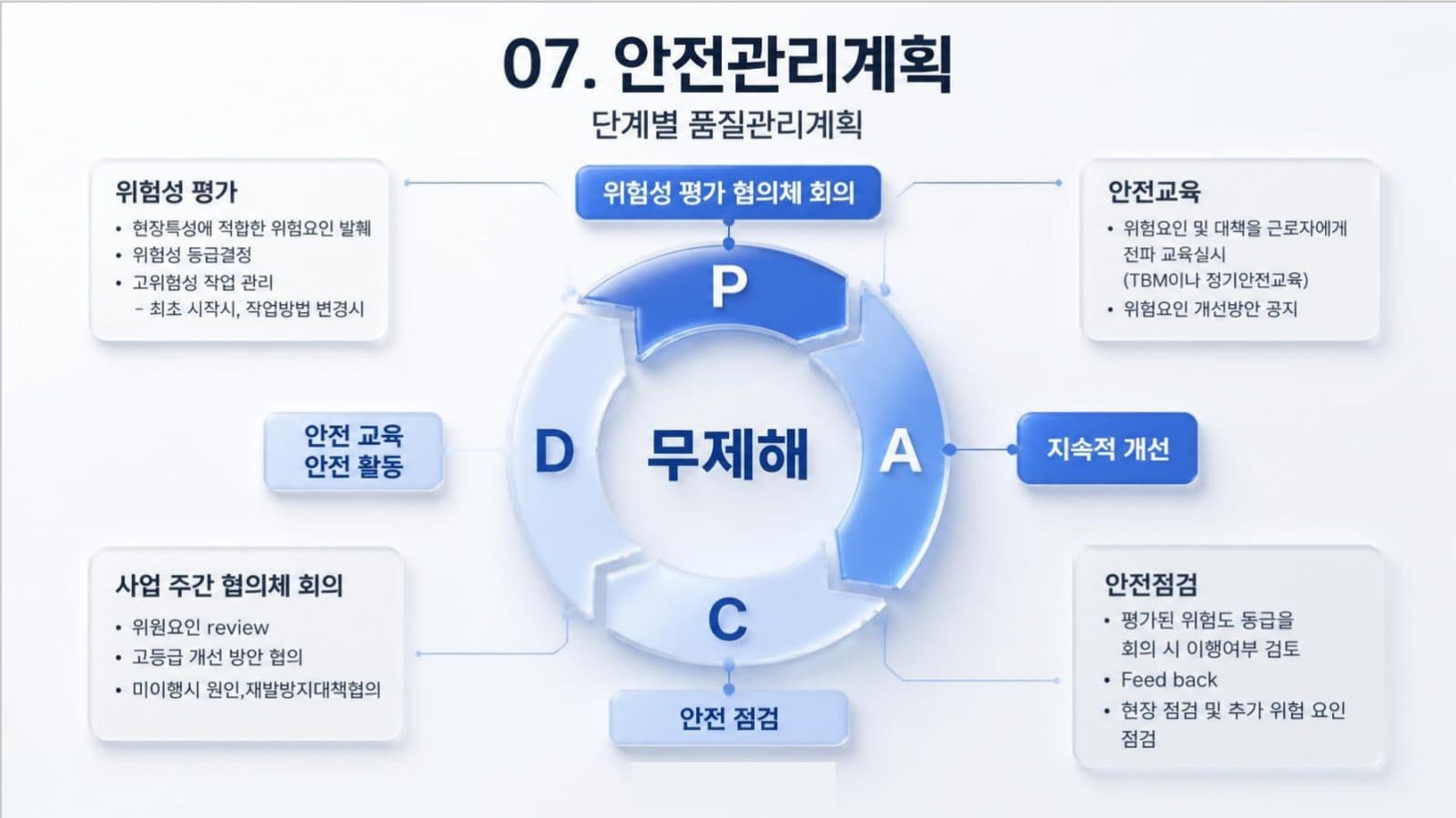
After: one clear PDCA cycle, each box beside its phase - 04
What to check afterwards: three things we found in this example
The customer who uploaded this deck chose “allow light editing”, which lets the AI tighten the wording while keeping the meaning, so the table text was condensed on purpose. We compared the table slide with the original line by line, and three kinds of change appeared. Figures were rounded: a pipe length of 23.302 km became 23.3 km and 0.161 km became 0.16 km. Specifications were dropped: the stormwater pipe's 450–800 mm size range, the count of 17 pumps, a 1.5 × 1.2 open-channel size and an equipment tag. And a masked name was filled in with a guess: “OO facility” became “irrigation facility”. None of this is visible unless you compare. For a bid, choose keep every word on the setup page, then check every figure and specification against your original before you submit.
How to check nothing was changed, page by page → - 05
Safety statistics and insurer or pre-qualification reviews: freeze the numbers
A safety page is read as data: an incident rate means little without the period it covers, and a certificate means little without its number and expiry date. Before you redesign it, write down what must not move: every rate, count and hour total with its unit, the date range each figure covers, the name, number and expiry date of each certificate, and the names of the insurer, client or standard you cite. Choose keep every word, add that list under “Any special requirements?” on the setup page, name any certificate scans that must stay as supplied, and afterwards compare the safety slides with your original line by line. The download menu has a text comparison report for the editable file, but it cannot read pages that come back as whole images, so check those by eye. In this example a redesigned table lost a size range and rounded a length while still looking right, which is the kind of change an underwriter or a pre-qualification reviewer notices. If the review has its own required form, fill that in and use the redesigned deck as the supporting presentation. We make no compliance claim: what you submit, and whether it is accurate, stays your responsibility.
What happens to drawings, site photos and certificates in a redesign → - 06
Board votes, utility programmes and retailer range reviews: what the reviewers look for
Three reviews that small trade and product businesses face have their own checklists. A condo or HOA board wants to know what is being done, what it costs per unit and who pays, whether the contractor is insured, and how long residents will be disturbed: put the scope, unit pricing and cost split on separate slides, and attach your certificate of insurance as the original file. A utility or rebate-programme reviewer checks certifications, installer numbers, your quality process and how customer savings are calculated, so keep each exactly as written and show the method on one slide. A retailer's buyer at a range review wants the range, each SKU with its wholesale price and margin, the packaging images, the compliance marks and the sell-through figures, all matching your price list. For all three, choose keep every word, list the figures and certificates that must not move under “Any special requirements?”, tell us which certificates or drawings must stay exactly as supplied, and compare the result with your original line by line. We have no real example from these trades to show yet, so judge the preview on your own file.
- 07
Your deck's language stays your deck's language
This example is in Korean and came back in Korean: BetterPPT keeps the language of the slides you upload and doesn't translate them, and bilingual slides stay bilingual. If you bid abroad, upload the version you will present.
- 08
For solar, HVAC, electrical and other specialty contractors
The same structure works at 10 to 15 slides. Start with a one-slide company profile (licences, years, crew size, service area), then three to five completed projects with a photo, a size and a result, then your safety record, certifications and insurance, and finish with a clear next step. Keep your own project photos: BetterPPT keeps good photos and re-composes them, and generates new imagery only where a slide has none. We haven't yet seen many installer decks, so judge the preview on your own file before paying the rest.
Tender and RFP presentations → - 09
What it costs, and how to try it
BetterPPT is $39 for up to 30 slides and $59 for 31–50, once, with no subscription, and a 30-slide deck takes about 15–20 minutes. A $9.90 deposit counts toward the price and shows you up to six of your own slides first. If a tender document is confidential, we can sign an NDA on request: email support@betterppt.com before you upload. Slide content is still processed by external AI models, so for sensitive drawings upload a sanitised copy.
See how it works → - 10
Who BetterPPT is for, and when a free tool is enough
BetterPPT is an AI-powered alternative to design services like 24Slides: it redesigns the PowerPoint you've already written, every slide individually, and returns an editable .pptx. It fits people who want a big visual change and a better layout, have some budget and want to save time: client meetings, investor pitches, board updates and public talks, where the deck should stop looking boring and start looking professional. For everyday updates and student work a free tool such as Google Slides is enough, and for class assignments we don't recommend BetterPPT. $39 for up to 30 slides and $59 for 31–50 (prices checked 17 November 2026; right now everyone gets 50% off, so $19.50 for up to 30 slides and $29.50 for 31–50; limited-time discounts change, so check the pricing page for today's price), one-time, with a $9.90 deposit to preview up to six of your slides first. Practical limits: it takes decks of up to 50 slides.
How AI redesign of an existing deck works →
Questions
How do I make a construction company's capability presentation look professional?
Put the facts in the order a reader needs them: company profile, track record, safety and quality process, certifications, next step. Use one idea per slide, a track-record table that reads in ten seconds, and a process diagram for the safety plan. Keep your own project photos.
Will an AI redesign change my project numbers or specifications?
Only as much as the content mode allows. In our example the customer chose “allow light editing” and the text was tightened: lengths were rounded and some size ranges were left out. Choose keep every word for a bid and compare every figure with your original before you submit.
Can an AI redesign my safety statistics slide without changing the incident rate or the reporting period?
It can if you choose keep every word, which carries the text over as written, but nothing here is guaranteed. In our contractor example the light-editing mode rounded a length and dropped a size range. Choose keep every word, list the figures and their periods under “Any special requirements?”, and compare every safety slide with your original before you submit.
How should I prepare a deck for an insurer's safety review or a contractor pre-qualification?
Put each statistic on the slide together with its unit, its period and its source, tell us which certificate scans and drawings must stay exactly as supplied and we keep your originals, and follow any form the reviewer requires. Use the redesign for the supporting presentation, then compare every figure with your records.
How do I make a contractor proposal ready for a condo or HOA board vote?
Give the scope, the unit pricing, who pays, your insurance and the disruption to residents their own slides, and end with the decision you want from the board. Keep the certificate of insurance as the original file, choose keep every word so specifications and prices stay as written, and compare the redesigned slides with your original before the meeting.
Can I redesign a capability deck for a utility or rebate programme without changing my certifications or savings method?
Yes. Choose keep every word, list your certifications, installer numbers, quality process and savings method under “Any special requirements?”, and name any certificates that must stay as supplied. Then compare every figure with your original; the text comparison report in the download menu lists every line that differs.
How should I present a range review to a retail buyer without changing SKUs, prices or margins?
Show the range first, then each SKU with its wholesale price, margin, packaging image and compliance marks, and finish with sell-through and next steps. Choose keep every word, tell us which packaging images and compliance marks must stay exactly as supplied, and check every SKU and price against your price list.
Can BetterPPT redesign a deck that isn't in English?
Yes. It keeps the language of the deck you upload and doesn't translate it. This article's example is a Korean-language deck redesigned in Korean.
How much does it cost to redesign a contractor's company presentation?
$39 for up to 30 slides and $59 for 31–50, one-time. A $9.90 deposit counts toward the price and lets you see up to six redesigned slides before you pay the rest.
Is it safe to upload a confidential tender or project drawings?
Slide content is processed by external AI models, and unpaid decks are deleted after 3 days. We can sign an NDA on request; email support@betterppt.com before you upload. For sensitive drawings, upload a sanitised copy.
Bottom line
If you have the facts and need the deck to look like a firm worth hiring, BetterPPT redesigns every slide individually and returns an editable .pptx: $39 for up to 30 slides, with a $9.90 deposit to see up to six of your own slides first. What you get is the most professional result of the four tools in our same-deck test, a strict keep-every-word option, chat editing for any slide, and the first slides in about 10 minutes (7–12 minutes in our recent jobs).
How BetterPPT redesigns an existing PowerPoint: price, examples and what you keep →