Consulting slides look premium because every slide is built to make one point, not because of fancy graphics. The headline is a full sentence stating the conclusion (an “action title”), the body is usually a single chart or framework that proves it, one colour highlights the one thing that matters, everything sits on the same grid with generous white space, and a small source line at the bottom says where the data came from. Read only the titles and you get the whole argument — what we call the Headline Spine Test. Copy that structure and a plain deck starts to look like it came from a top firm.
- 01
Write every headline as the conclusion
“Market overview” is a label; “The mid-market is growing twice as fast as enterprise” is a consulting headline. Our redesign rules keep a slide's main headline to 6–12 words, 14 at most, and split anything longer into a headline and a subtitle. Then run the Headline Spine Test: read the titles alone, in order. In a consulting deck they read like an executive summary.
The Headline Spine Test → - 02
One chart per message, rebuilt to make the point
Consultants rarely paste a table. They ask what the data says, write that as the headline, and chart only that comparison, sorted so the answer is obvious. Below, a table of five countries' economic sentiment became one diverging bar chart with Spain's 56% “very weak” highlighted. All 20 figures match the original table; the headline (“Overwhelmingly Pessimistic”), the row order and the shortened legend (“Very or extremely weak” became “Very weak”) are the redesign's choices — check that kind of change before you present.
How to make charts and tables easier to read →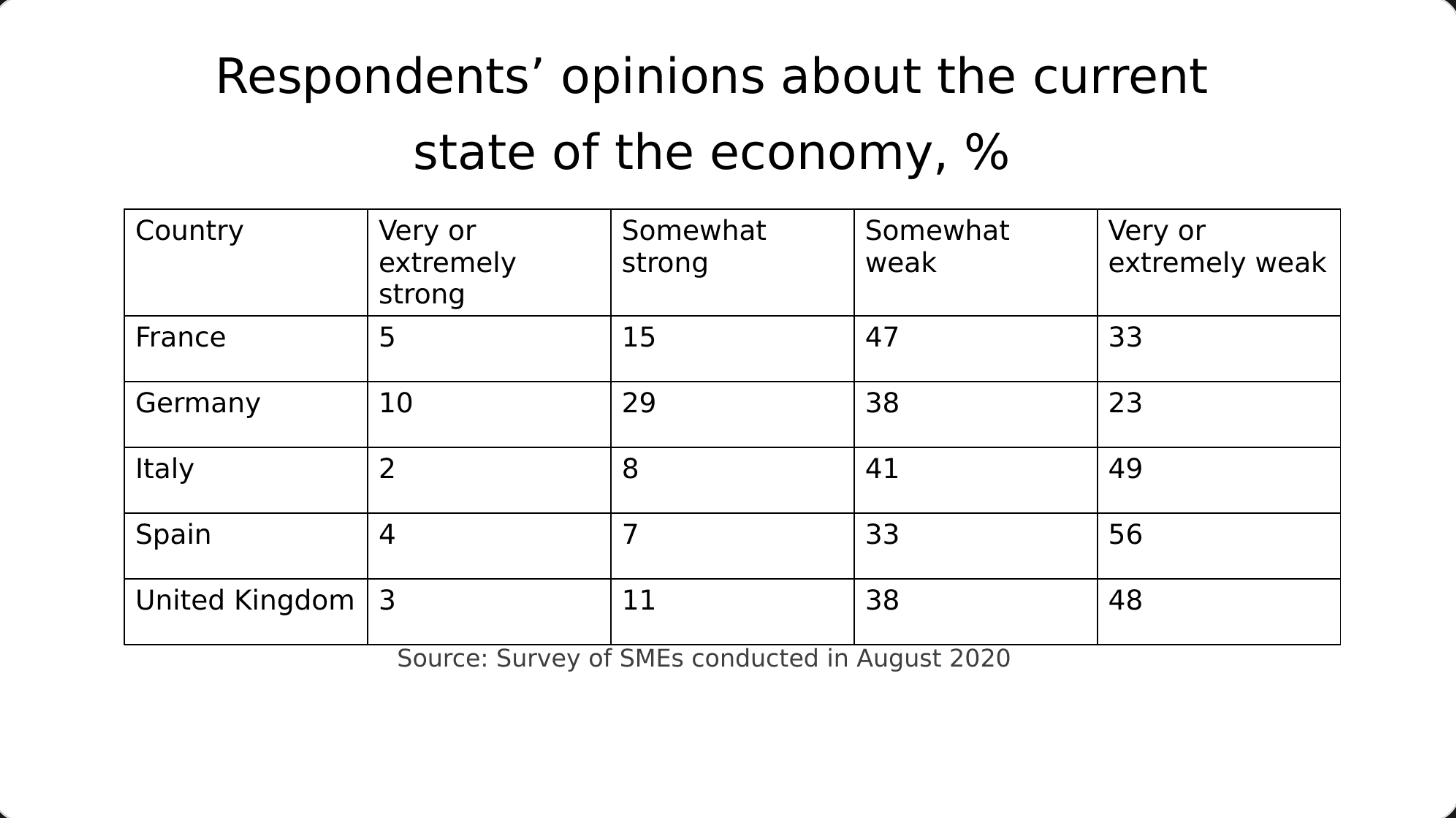
Before: a table of percentages, nothing stands out 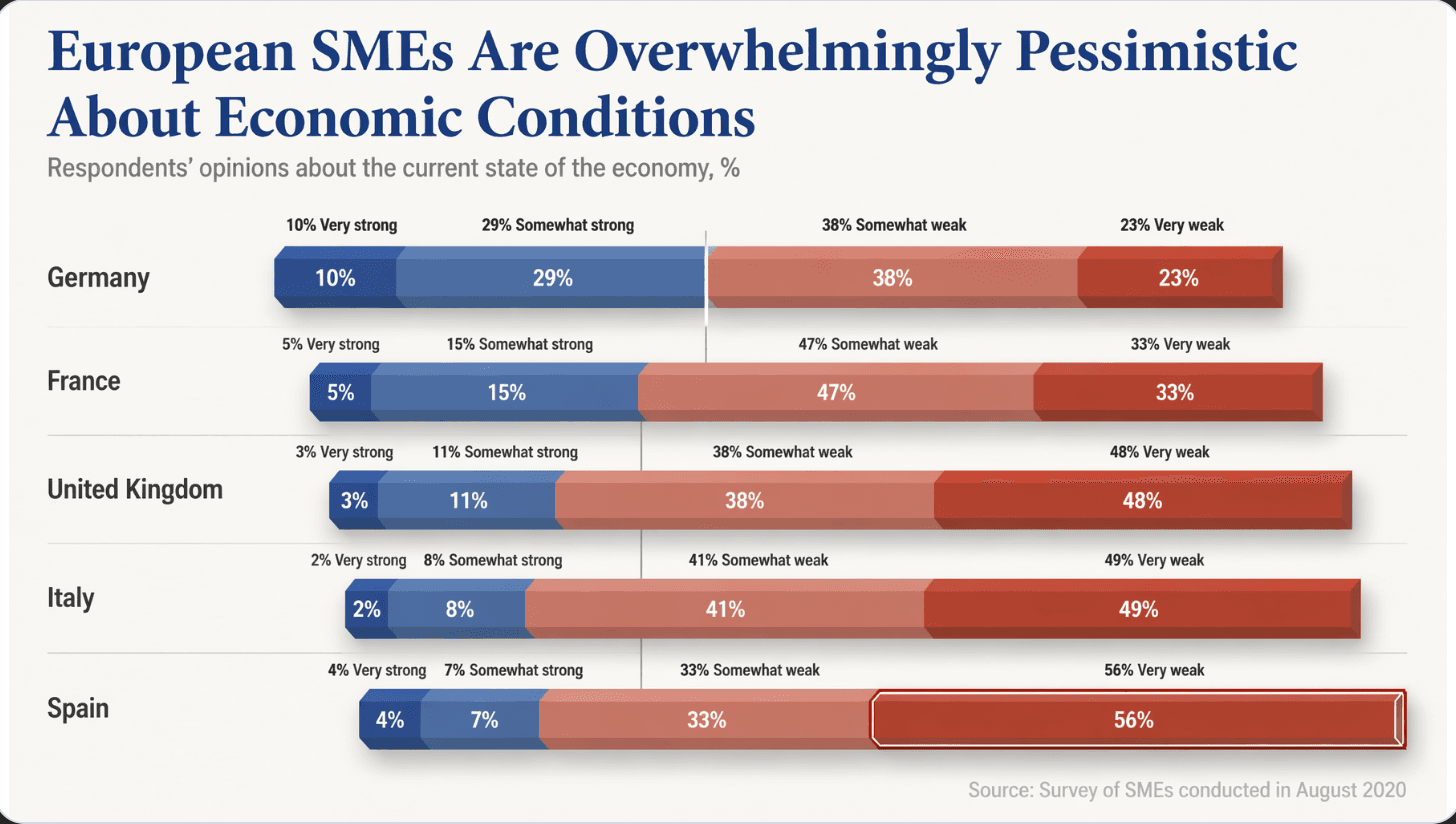
After: one diverging chart and a conclusion headline - 03
One highlight colour, everything else grey
Premium decks look calm because colour is rare. Our design rules build hierarchy from type size, weight and contrast, and use colour only to mark the focal point — the one bar, number or phrase the headline is about. If every series has its own bright colour, the reader can't tell where to look.
- 04
Same grid, same margins, a source line on every data slide
Put the headline in the same place on every slide, align everything to the same margins, and leave white space instead of filling it. Add a small source line under every chart and table. It costs nothing, and it's one of the most recognisable signals of consulting-quality work: the numbers can be traced.
- 05
Who BetterPPT is for — and who it isn't
BetterPPT is an AI design agent that redesigns PowerPoint decks you've already written — every slide individually — and returns an editable .pptx. It's for decks where a lot is riding on it — client proposals, investor meetings, board updates, promotion reviews and conference talks — when the analysis is done and the slides look plain. It isn't for a class assignment or a routine team update: free tools like PowerPoint Designer or Canva's free plan are enough for those. It's paid — $39 for up to 30 slides, with a $9.90 refundable deposit to preview up to six of your slides first — and it won't do the analysis for you.
PowerPoint design service: how it works →
Questions
What is an action title on a slide?
A headline written as a full sentence that states the slide's conclusion, instead of a topic label. “The mid-market is growing twice as fast as enterprise” is an action title; “Market overview” is not. Read the action titles alone, in order, and they should tell the whole story.
How do I make a 400k proposal deck look credible fast?
Rewrite the titles as conclusions first, then fix the slides the client will judge: the executive summary, the evidence (one chart per point, with sources) and the scope, timeline and fee. Keep one style throughout. Design comes after the argument holds.
Can an AI tool turn my bullet slides into consulting-style charts?
It can redesign the layout and turn tables into charts, but you choose how much it may change: BetterPPT has keep every word, allow light editing and allow restructuring. In the chart example above, all 20 figures matched, but the headline and row order were new — review every slide.
What does BetterPPT cost, and what are its limits?
$39 for up to 30 slides and $59 for 31–50 slides, one-time with no subscription; a refundable $9.90 deposit lets you see up to six redesigned slides first. It costs more than subscription tools and has no in-browser editor — you edit the returned .pptx in PowerPoint. It accepts .pptx files up to 50 slides and 50 MB.
Bottom line
Start with the titles: rewrite each as the conclusion, then make every chart prove exactly that. If the whole deck needs the consulting look, BetterPPT redesigns every slide individually and returns an editable .pptx — a refundable $9.90 deposit shows you up to six of your own slides first.